

October 23, 2026 ● 10 min read
What Is an Amazon Fulfillment Center?








An Amazon fulfillment center is a building where Amazon stores products, then picks, packs, and ships customer orders. Sellers use it through Fulfillment by Amazon (FBA): you send inventory to Amazon, and Amazon order fulfillment covers storage, delivery, customer service, and returns. Amazon’s own selling glossary calls a fulfillment center “a short-term storage facility”.
Here is how Amazon fulfillment works: follow one unit from your shipment to the customer’s door. Amazon describes the job as receiving and storing inventory, packing and shipping orders, and handling customer service and returns.
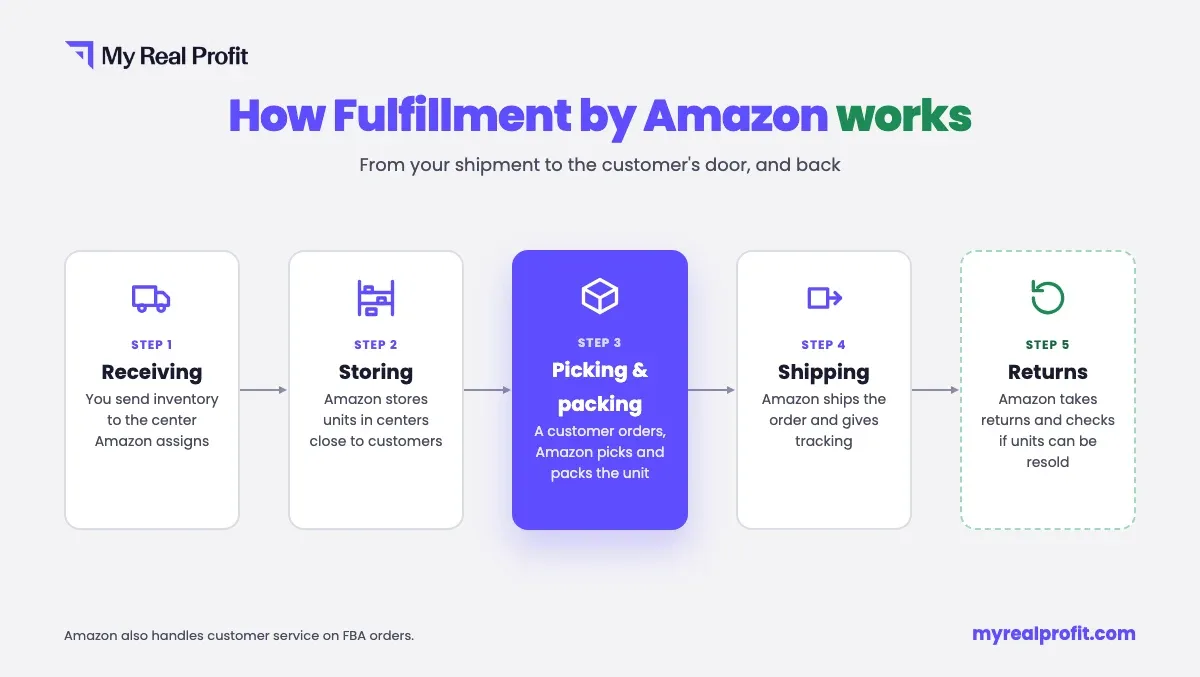
Receiving. You create a shipment in Seller Central and send it to the fulfillment center Amazon assigns. Until Amazon checks the units in, they show as inbound in your inventory.
Storing. Amazon places the units in storage and spreads them across centers close to customers. This distribution is the inbound placement service, which Amazon charges for separately. Your units become sellable once they are in stock.
Picking and packing. When a customer orders, staff pick the unit from the shelf and pack it. You do not touch the order.
Shipping. Amazon ships the order and gives the customer tracking. From there, Amazon’s sort centers and delivery stations take it to the customer.
Returns. Amazon takes the return, handles the customer, and decides whether the unit can be sold again. Returned units come back to your inventory as sellable or unsellable.
A unit you send to FBA can pass through several kinds of Amazon buildings before it reaches a customer. Each one does a different job:
| Facility | What it does | What it means for you |
|---|---|---|
| Sortable fulfillment center | Picks, packs, and ships smaller items, such as books, toys, and housewares | Where most standard-size units are stored and sold from |
| Non-sortable fulfillment center | Picks, packs, and ships bulky or larger items, such as patio furniture or rugs | Bulky SKUs are stored here, often in a different building from your smaller ones |
| Inbound cross-dock (IXD) | Receives seller shipments and sends the inventory on to fulfillment centers | Units here are not sellable yet |
| Amazon Warehousing and Distribution (AWD) | Bulk storage before inventory moves into fulfillment centers (more in the AWD section below) | Not available to customers yet |
| Sort center | Sorts customer orders by final destination | Handles orders after they ship. You never send inventory here |
| Delivery station | Prepares orders for last-mile delivery to customers | Part of delivery, not storage |
The facility type tells you where a unit is in the chain. Only units in a fulfillment center count as sellable stock. A shipment delivered to an IXD is still on its way to a fulfillment center, and stock in AWD has to move into one before customers can buy it. The split between sortable and non-sortable centers also explains why standard-size and bulky SKUs from one shipment plan can end up in different buildings.
Amazon does not publish an exact count. Its seller page says the network includes “hundreds of fulfillment centers worldwide”, and its facilities page speaks of “hundreds of world-class facilities” around the globe. Counts on third-party sites are estimates, and they go out of date as Amazon opens new buildings and closes old ones.
For your business, the list that matters is shorter: the centers that hold your units. Your shipping plans show where each shipment goes, and the reports below show which centers your stock has moved through.
When you create a shipment in Send to Amazon, Amazon picks the destination. In a Seller Forums post about inbound placement, Amazon lists what affects the locations it offers: the product types and quantities in your shipping plan, existing inventory levels across the network, where customer demand is, and fulfillment center capacity.
Size matters too. Bulky items go to non-sortable centers, and some placement options exist only for large bulky items. What you do control is how many locations you ship to, through the inbound placement option:
Amazon shows only the options your shipment qualifies for. The trade-off is simple: pay the fee and ship to one place, or skip the fee and split the shipment yourself.
Each Amazon facility has a short code, such as ONT1 or MCO1: three letters and a number. The letters often match the nearest airport code (MCO is Orlando), and the number separates buildings in the same area. You see the code as the destination in your shipping plan and in the “Fulfillment Center” column of the Inventory Ledger report. Amazon has no public list of codes, so the address in your shipping plan is the reliable source for each shipment.
Not every unit in a fulfillment center is ready to sell. Amazon puts some units on hold, moves some between buildings, and reserves some for orders. Each of these shows as a separate status in your reports.
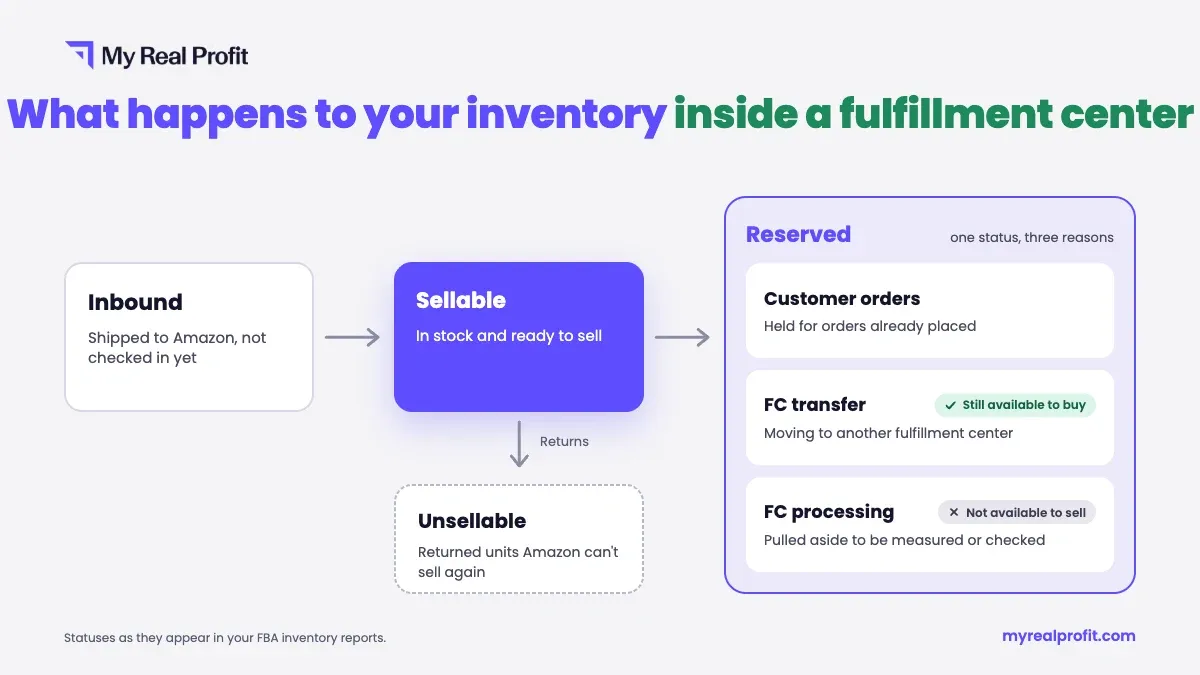
In Amazon’s words, FC processing means units are “sidelined at the fulfillment center for additional processing”. A unit can be pulled aside to be measured, checked, or sampled. While it sits in FC processing, it is not available to sell. Amazon does not publish a standard time for this on its public pages.
An FC transfer is a unit moving from one fulfillment center to another. An Amazon staff reply on the Seller Forums says units in transfer are “still available for purchase”, with a delivery date based on when they reach the new center.
Reserved is a group status. It covers units held for customer orders, units in FC transfer, and units in FC processing. A high reserved count is normal after a sales spike. A count that stays high on one SKU is worth checking. Our guide to reserved inventory explains each type and what to do about it.
The difference is how long goods stay. Amazon defines a warehouse as “a long-term storage facility”, while a fulfillment center is short-term storage built for picking, packing, and shipping. Amazon also notes that “a distribution center and a warehouse are similar things.”
Amazon runs both. Its FBA fulfillment centers are set up for fast order handling. Amazon Warehousing and Distribution (AWD) holds inventory in bulk, where it waits before it moves into fulfillment centers. So an “Amazon seller warehouse” can mean AWD, a fulfillment center, or any Amazon building, depending on who says it.
FBA costs come in several separate fees. Each one is calculated in its own way:
For 2026, Amazon raised FBA fees by an average of $0.08 per unit sold, starting January 15, and added no new fee types. Since April 17, 2026, a 3.5% fuel and logistics surcharge also applies to fulfillment fees. To see what these fees mean for one product, run it through an Amazon FBA calculator with your price, size, and cost of goods.
Seller Central gives you the raw data across all Amazon FBA fulfillment centers. The Inventory Ledger report has a “Fulfillment Center” column and keeps every movement of your inventory for 18 months. Our guide to Seller Central reports shows where to find each one.
Raw reports tell you where units are. They do not tell you when you will run out.
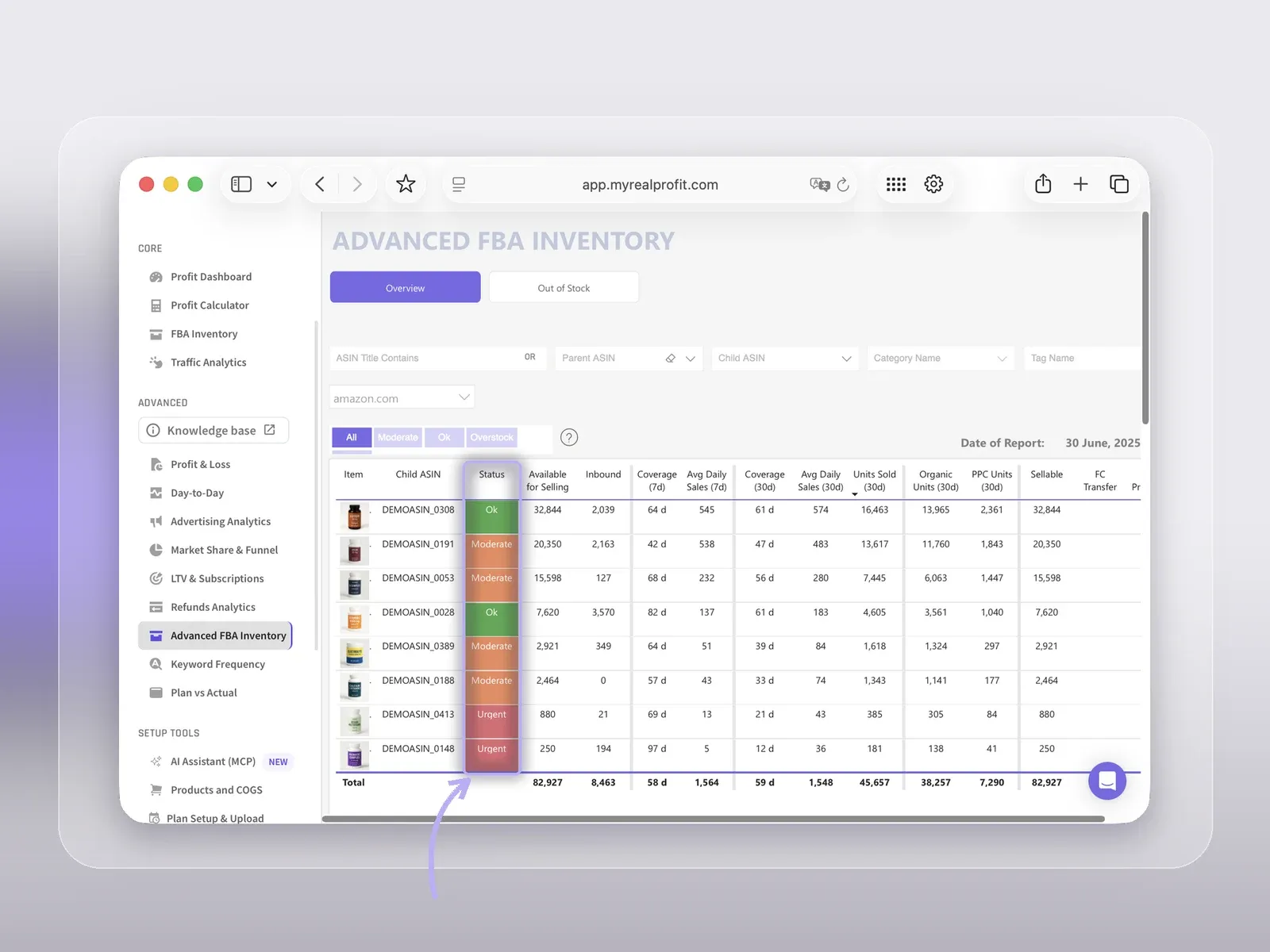
In My Real Profit, the FBA Inventory report shows sellable, reserved and inbound stock for each SKU, its inventory value, and how many days the stock will last, based on average daily sales over the last 30 days. The data updates once a day, when Amazon releases its report.
Advanced FBA Inventory adds sales speed over 7 to 180 days and the last 12 months, and splits stock by disposition, including FC Transfer. See how it works in our inventory analytics.
Amazon does not publish a standard time on its public pages. If units stay in FC processing much longer than usual for your account, open a case with Seller Support.
Download the Inventory Ledger report in Seller Central. Its detailed view lists the fulfillment center for every inventory movement over the last 18 months.
Amazon does not state a maximum on its public pages. After 181 days, units start to carry an aged inventory surcharge every month on top of the storage fee.
It stores sellers’ inventory for the short term, then picks, packs, and ships each order. For FBA sellers, Amazon also handles customer service and returns from there.
Anyone can book a free public tour. Amazon runs tours at “more than 50 sites across 12 countries”, and each lasts about 60 to 90 minutes. A tour is a general visit, not access to your own inventory.
No. Amazon assigns the destination when you create a shipment. You choose the inbound placement option: one location for a fee, or several locations with no placement fee, if your shipment qualifies.