


June 28, 2023 ● 9 min read
Amazon Seller Reports Guide: All Reports Explained With Links








For CPG brands selling on Amazon, growth often comes down to three things: understanding where you’re winning, where you’re wasting spend, and where the next opportunity lies. The question is: where to get these insights?
That’s where Search Query Performance (SQP) reporting takes the spotlight. Amazon’s SQP report gives you visibility into customer behavior at the keyword level, showing impressions, clicks, add-to-carts, purchases, and more.
Here’s how to use it as a weekly operating tool, not just a data dump, to grow your CPG brand in 2025.
The Search Query Performance (SQP) report is available inside Amazon Brand Analytics. It gives keyword-level data on:
It’s important to mention that you can filter this data weekly or monthly, by brand view or ASIN view, and use it to measure:
Now, when you are confident with the report basics, let’s look at how you can turn this data into a real strategy. Below you can find some of the most effective ways to look at it:
Market share is vital for Amazon sellers because it reveals their competitive position, growth potential, and overall performance within their product category. Market share can be measured through purchases and clicks.
Your sales increase or drop is connected to your click/purchase share drop, too. When this happens, you should track this WoW (week over week) to determine whether a 10% decline matches a 10% drop in sales in market clicks. This helps you see if your sales drop is due to internal factors or market conditions.
Track your market share weekly to understand:
Use case example:
If your sales dropped 10%, but your purchase share stayed at 8%, it’s likely due to less demand overall (seasonality or macro trend). But if your purchase share dropped from 8% to 5%, most probably it means that a competitor may have taken share.
Some keywords are already “maxed out” in terms of visibility, meaning both your organic rank and ad placements are strong. At this point, pushing more PPC does not create incremental sales; it may cannibalize your own organic revenue if your keyword strategy isn’t balanced between paid and organic performance.
The question that you need to answer is: are your ads adding incremental sales or just replacing organic ones?
Here are a couple of insights that are important to understand:
Now, when you have the relevant knowledge of cannibalization optimization principles, let’s dive into the “how-to” of maximizing your keywords.
In order to define your maxed-out keywords, check these 3 metrics:
Then, use this as your guide when looking at the data to analyze and understand your cannibalization situation:
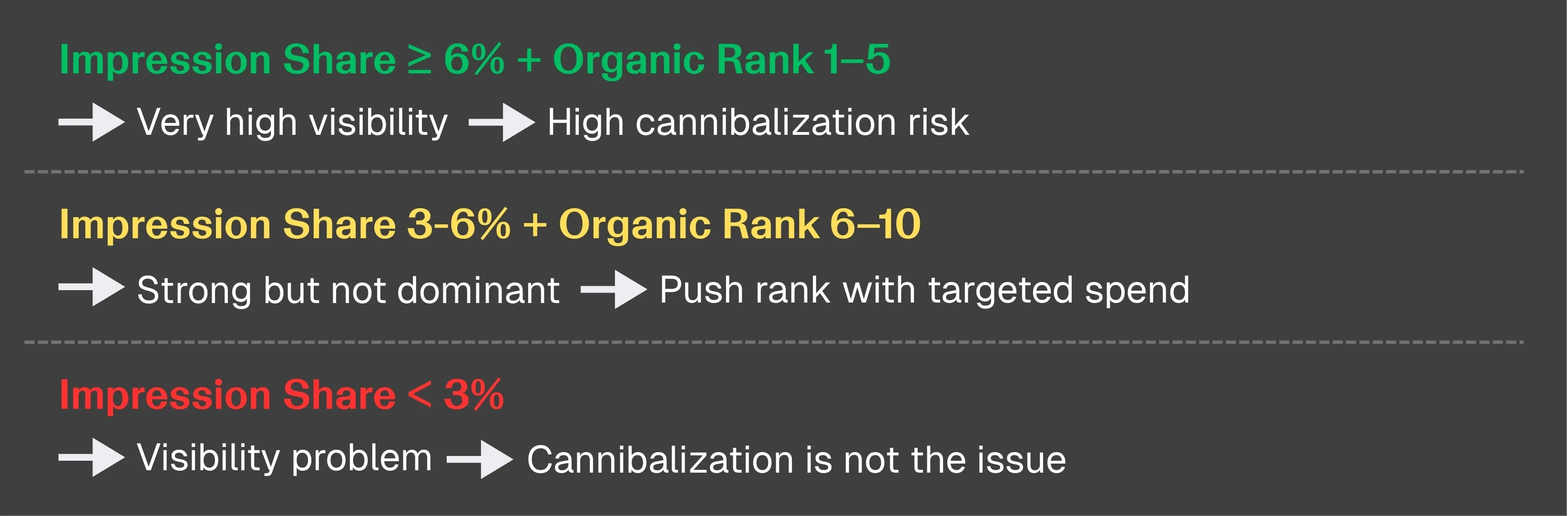
It’s important to mention that the max impression share per ASIN is ~8%. Hitting 6%+ means you’re close to the ceiling.
However, to get the full picture, you shouldn’t look at the metrics in isolation. The statements below can serve as your decision logic when interpreting complex data effectively:
If Rank 1–5 and Impression Share > 6%:
If Rank 6–10 and Impression Share 3–6%:
If Impression Share < 3%:
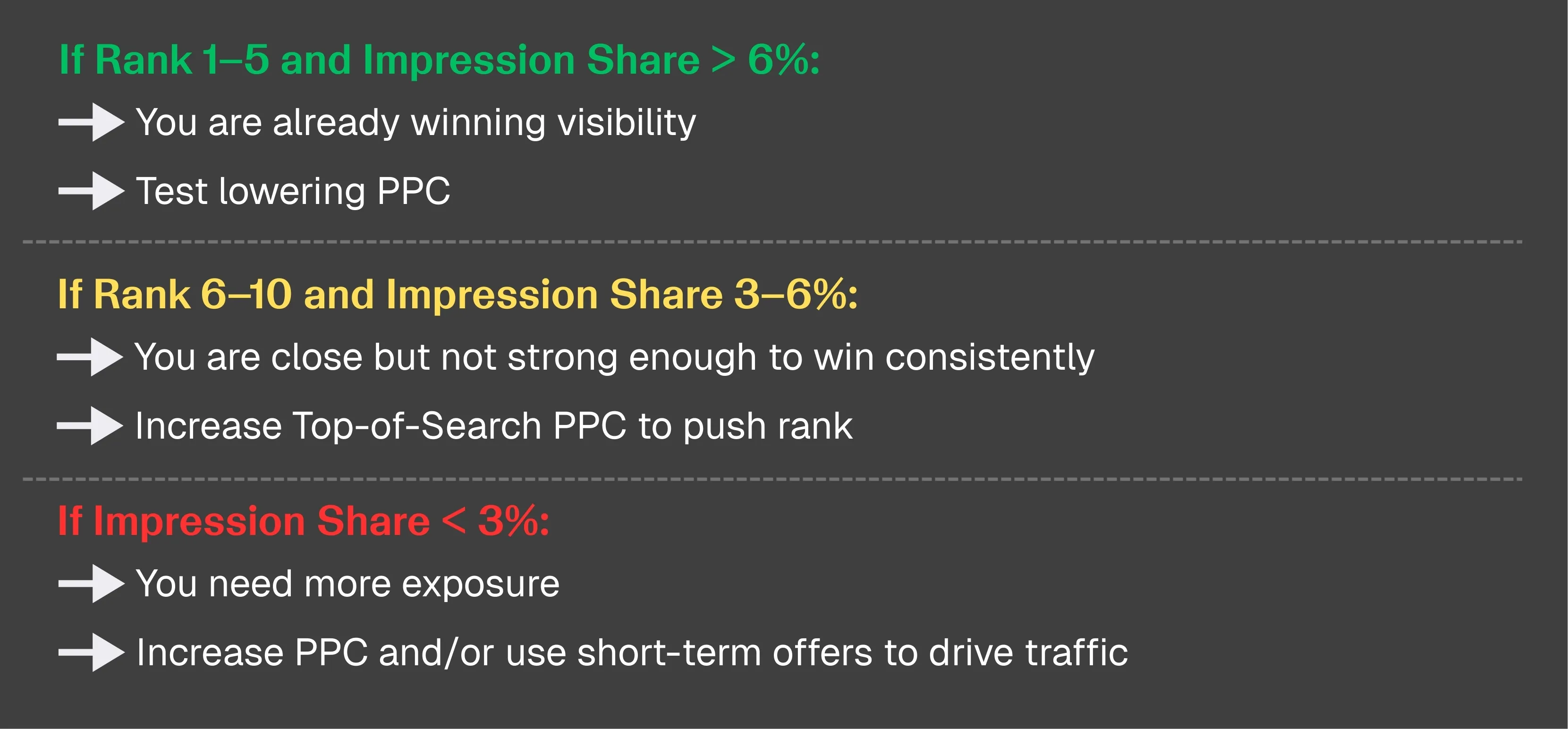
You can actually test your keywords for cannibalization! We’ve put together clear, step-by-step instructions and guidance on interpreting the results — your own mini-guide:
Step 1: Reduce PPC bids by 10-20% on the keyword for one week
Step 2: In one week, compare these metrics :
Step 3: Analyze metrics based on this decision logic:
If all stay stable:
You were overspending. Keep lower spend.
If any drop:
Ads were protecting your position. Restore spend.
If Performance Still Doesn’t Improve:
Your visibility is fine. Your page is the problem.
This is the simplest and most reliable cannibalization test that you can do anytime when you have doubts about cannibalization.
Branded keywords are highly important, especially if your brand is already strong, because shoppers will search for you directly rather than searching for a product.
Here is what it means for you in terms of keywords and user behavior:
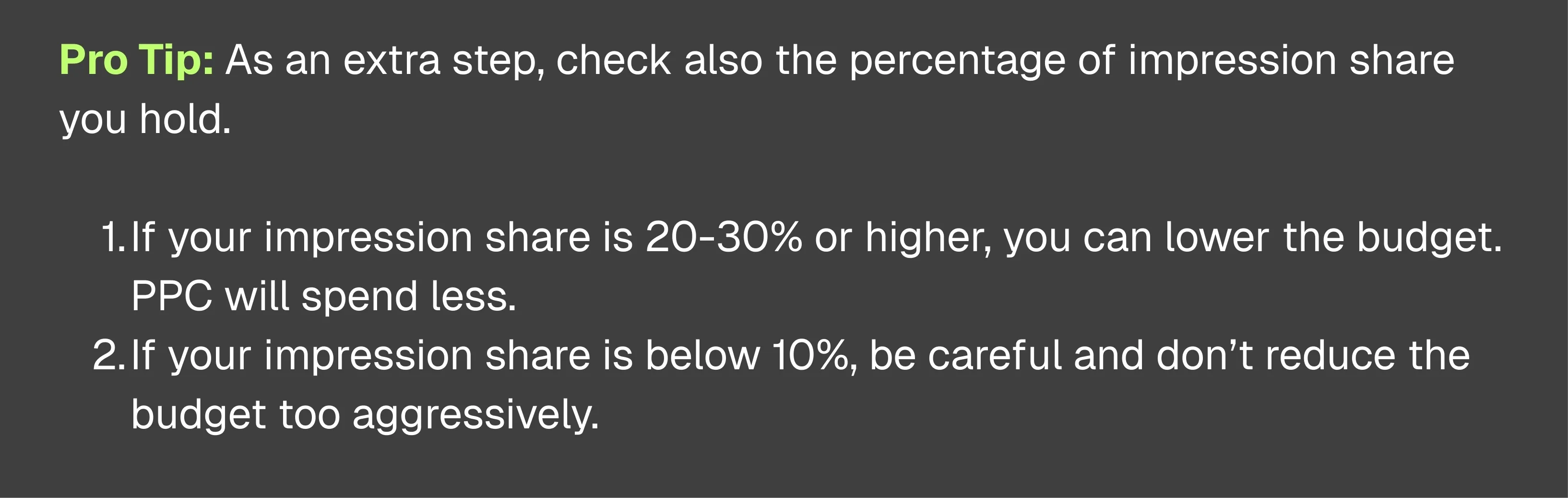
In order to select the appropriate strategy, check the percentage of click share and purchase share you hold for your branded keywords. Then analyze it with these tips:
Pro Tip: As an extra step, check also the percentage of impression share you hold.
Sometimes, brands pour money into keywords with low search volume, while underinvesting in higher-volume opportunities. The SQP report helps you to uncover and fix that.
Are there keywords where you spend a lot, and others where you spend even more have reasonable volume? Reviewing this can help you identify opportunities to rebalance your budget for better efficiency.
Here is what you can do to define optimization opportunities:
These 3 simple steps will improve your ad efficiency and help to scale without increasing spend.
The SQP report can provide valuable insights not just for PPC optimization, but also for your product development. By analyzing which searches show the strongest purchase intent, you can spot patterns around flavor, format, pack size, or problem-solution angle that signal unmet demand.
Here are 3 simple steps to follow to look at the SQP report for product development purposes:
Use case example:
You sell blueberry gummies, but the report shows high demand for a strawberry and lemon flavor; however, your brand is barely present in that area.
This is a clear sign to:
Understanding how to interpret market data from the SQP report is highly valuable, as it allows you to launch products based on proven market demand rather than gut feeling.
Comparing your Amazon listing metrics, like CTR and conversion rate, to the market average is crucial. Without context, numbers like “5% CTR” don’t tell you much. Comparison shows you where your listing underperforms, what your competitors are doing better, and where to focus your optimizations.
These metrics are only meaningful when compared to the category average or top competitors. Doing so allows you to make data-driven decisions instead of relying on gut instinct, helping you launch products and optimize listings based on proven market demand.
Key Metrics to Monitor
Step-by-Step Comparison Process Using SQP and Brand Analytics
If you’re underperforming, follow these steps:
Go to Brands → Click Brand Analytics.
Open the Search Query Performance (SQP) report.
Choose ASIN view.
Click on any keyword.
From there:
Find top competitors on the same keyword.
Compare their price, image, title, badges, and reviews.
Ask yourself:
Is their price lower?
Is their image clearer or more attractive?
Do they have coupons, Prime shipping, or better reviews?
Make small improvements → retest → monitor SQP metrics next month.

! If your overall CTR is lower than competitors and your conversion rate is also lower, it’s time to optimize your listing.
Use these must-have optimizations for each listing element to boost your listings’ performance.
For CPG brands on Amazon, growth isn’t just about spending more; it’s about making every move smarter.
True growth comes from:
The only report that gives you this full picture? Correct, it’s the Search Query Performance (SQP) report.
At My Real Profit, we help CPG brands turn SQP insights into weekly action. From automated keyword reporting to real-time market share shifts, we give you the clarity to grow smarter, faster, and with confidence.
Try My Real Profit for free and start making the most out of your Amazon data today
1. What is the Amazon Search Query Performance (SQP) report?
The Amazon Search Query Performance (SQP) report is part of Amazon Brand Analytics and provides keyword-level data such as impression share, click share, add-to-cart share, and purchase share. CPG brands use it to track market share, optimize PPC performance, and discover new product opportunities.
2. How can CPG brands use SQP data to increase Amazon sales?
CPG brands can use SQP data to identify keyword-level opportunities, monitor market share changes, reduce wasted PPC spend, and develop new product variations based on search demand. Tracking metrics weekly enables smarter pricing, advertising, and listing optimization decisions.
3. What is keyword cannibalization on Amazon and how can brands avoid it?
Keyword cannibalization occurs when paid ads replace organic clicks rather than adding incremental sales. Brands can test for cannibalization by lowering PPC bids 10–20% for a week and comparing performance metrics like click share and total sales to determine if spend is truly incremental.
4. Why is tracking market share weekly important for CPG brands?
Weekly market share tracking helps brands understand whether sales changes come from internal performance issues or overall market demand shifts. It provides an early warning system for competitive threats and helps optimize pricing, advertising, and product visibility.
5. Should brands run PPC ads on branded keywords?
Not always. If a brand already holds 90%+ click or purchase share on branded terms, ad spend might not add incremental value. Lowering PPC bids temporarily can reveal whether ads protect visibility or simply cannibalize organic sales.
6. How can the SQP report support new product development?
The SQP report identifies search trends with high purchase intent where a brand has low visibility. This helps CPG brands find growth-ready keywords and launch new products, flavors, or pack sizes based on proven consumer demand rather than guesswork.
7. What metrics should CPG sellers compare to market averages?
Brands should compare CTR (click-through rate), conversion rate, and add-to-cart rate to market averages or top competitors. These comparisons help pinpoint weak listing elements like images, pricing, or titles that reduce visibility and conversion.
8. How does SQP data integrate with AI or GEO-AI analytics?
AI and GEO-AI tools can analyze SQP data to detect regional trends, automate keyword adjustments, and forecast demand across different markets. This helps CPG brands localize their Amazon strategy and allocate budgets more effectively based on geography and consumer behavior.
9. What are the best practices for optimizing Amazon listings using SQP insights?
Use SQP data to benchmark against competitors, then improve your main images, titles, and A+ content. Focus on clarity, keyword relevance, and differentiation. Test updates monthly and track changes in CTR and conversion rate to measure impact.
10. How can My Real Profit help CPG brands grow on Amazon?
My Real Profit automates SQP reporting and converts raw data into actionable insights. It tracks weekly market share shifts, identifies wasted spend, and helps brands make data-driven decisions that protect margins and accelerate growth.