

March 10, 2023 ● 11 min read
Profit and Loss Statement for Amazon Sellers







Are you looking to break into the Amazon marketplace and start selling items in bulk? Selling wholesale on Amazon can be a great way to make more money, but it’s important to understand how it works before diving in.
Selling wholesale on Amazon involves many steps, from setting up a business and sourcing products to managing inventory. This article will provide a step-by-step guide to help you navigate the process and become a successful Amazon wholesale seller.
A business model called Amazon wholesale involves purchasing products in bulk directly from manufacturers or wholesale suppliers at a discounted price and reselling them on the Amazon platform.
By buying wholesale products, you can get lower prices than what is typically offered to retail customers. This allows you to increase your profit margins while still offering competitive prices for shoppers.
At first glance, wholesale may seem similar to other Amazon business models such as dropshipping. However, several key differences make the wholesale business model a unique option for businesses looking to maximize their profits.
Wholesale selling involves buying branded products from manufacturers or distributors in bulk and reselling them without any changes. This type of selling generally requires less capital than private label products, since you’re not investing in creating your own product. However, you’ll need to find reliable suppliers and negotiate pricing with them.
Private label sellers create their own branded products to sell on Amazon, while wholesalers buy and resell existing branded products. This requires a higher upfront investment than wholesale selling, but it can be more profitable in the long run because you can set your own pricing and control the quality of the product.
Wholesale selling and arbitrage have some common features like they are both based on the principle that resellers buy branded products. Retail arbitrage means sellers purchase discount products in retail stores to sell them for more. With wholesale selling, you contact suppliers directly and buy the product in large quantities.
The main advantage of retail arbitrage is that it is relatively simple and does not require a large investment upfront. However, margins tend to be lower than those of wholesale sellers. Additionally, with arbitrage, you have less control over product quality because you purchase products from other retailers.
The dropshipping method requires you to advertise products on Amazon and buy them from your supplier only when you have made a sale. You won’t have to handle the storage, packing, or shipping of items.
When you use Amazon’s wholesale business model, there is no one between you and the manufacturer. You are the supplier for Amazon, meaning that you control your inventory and take charge of all your stock. Furthermore, you will have to fulfill each order yourself or use the FBA program. Thus, owning all the items and being responsible for selling and sending them out.
More info read: How to Dropship on Amazon: 7 Steps to Dropshipping Business
Note that, to sell on Amazon, sellers must follow specific business setup practices regardless of their selling method. Wholesale sellers may need to obtain a business license, a sales tax permit, or a “resale certificate.” A wholesale license allows you to buy products from the manufacturer tax-free.
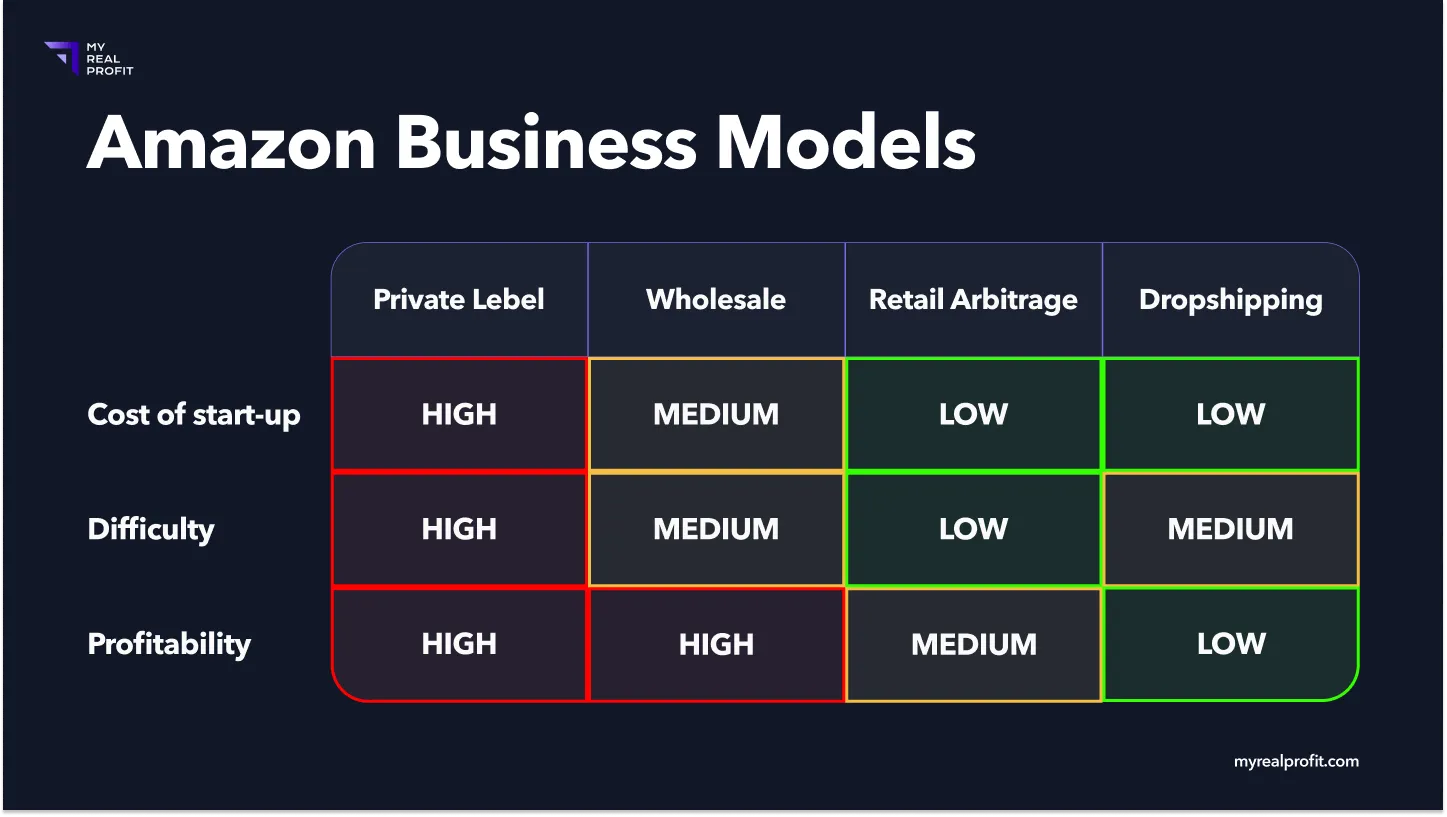
Below, you will find a clear table with the most popular Amazon business models. This table will help you understand them and be ready for any potential difficulties.
Quick to start up
You can get everything set up in ~6 weeks! Getting the stock from wholesale suppliers may take some time.
Product demand
Many buyers who shop on Amazon prefer established brands that offer quality products. You can sell recognizable brands that consumers are already searching for and buying, thus reducing the marketing burden on your business. Therefore, you don’t have to worry about creating loyalty since the product is already well-known and trusted by consumers.
High profit margin
Most wholesale sellers don’t make any advertising on their products. This means wholesalers make more money in the end.
Scalability
Your Amazon wholesale business has the potential to grow and increase your profits. You can easily scale up by buying more at a lower cost, thus allowing you to increase the number of products in stock and widen your customer base.
Cost of start-up
You should have some capital on hand before starting an Amazon business. Wholesale suppliers require minimum order quantities, so you will need to invest in bulk purchases.
More risk
If you decide to invest more money, you must be aware that the level of risk will also increase. In the case that you make bulk purchases in large quantities that don’t get sold, there is a possibility of facing financial losses.
Lack of product control
You are selling products that you do not own or manufacture, meaning you have no control over what happens to them. You must rely on your supplier’s quality and availability of items, which could lead to customer complaints and negative reviews.
Competition
It is important to note that many other sellers are using the same business model as you. Additionally, almost all of the listings on which you place will have multiple sellers, so competition can be high. You must find ways to stand out from the crowd, such as providing better customer service or offering lower prices.
Time-consuming
To run a successful Amazon wholesale business, you must be ready to invest time and effort into the backend process that involves supplier management and price negotiations. It may be time-consuming, but it`s crucial for success.
Before you can start selling wholesale products on Amazon, you’ll need to create an Amazon Seller Account. This gives you access to the tools and services needed to run your business efficiently. If you already have one, you can skip this step and move on to the next.
This will take you to the sign up page. Fill in all the required information and follow the instructions to complete your registration process.
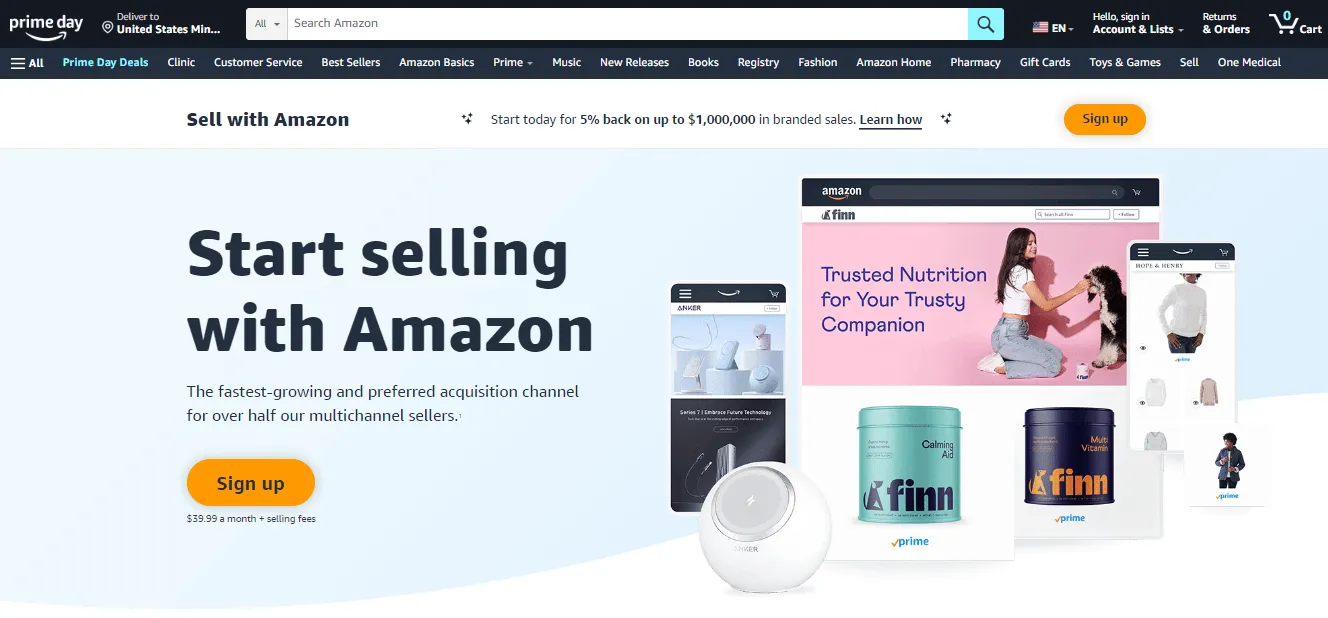
A professional account costs $39.99 per month, but this account provides access to advanced tools and reports necessary for competing and operating as a wholesaler.
After signing up for an Amazon Seller Account, you will need to create your business profile, including setting up product categories, payment preferences, shipping and return policies, and other important information about your business. This information provides customers with a clear idea of what they can expect from your store.
Now it is time to research products you want to sell as an Amazon wholesaler. You should look into popular existing branded products and products that are in high demand. It is important to make sure you are selling quality items that will address customer pain points.
This is the most important factor when deciding what to sell. Look for items that are popular and have a high search volume. Look at websites like Amazon and eBay to see what’s trending. You can also use research tools to find out what people are interested in.
Take a look at products in one of the best-selling categories on Amazon:
Electronics
Toys & Games
Home & Kitchen
Shoes & Jewelry
Clothing
Study the list of Amazon’s best sellers in every category
Once you have identified the products that will do well in the wholesale market, narrow down your list and begin researching each product individually. Please take a look at customer reviews, search for the product on Google to check out what others are saying about it, and read the Amazon description of each product.
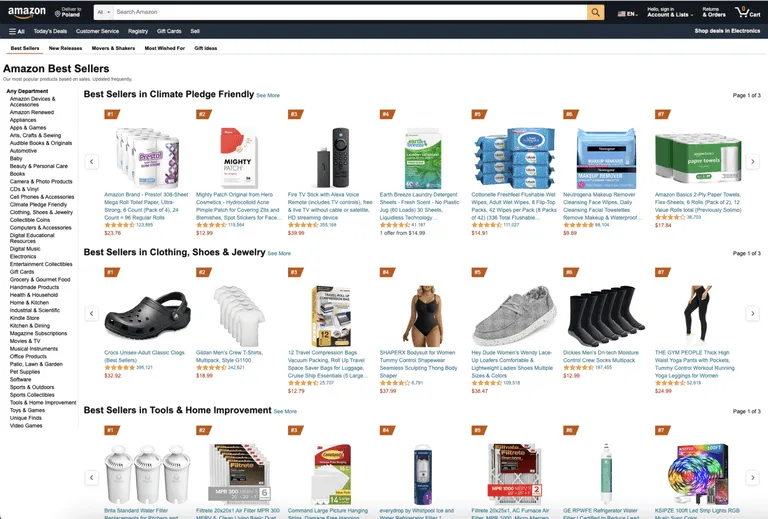
Study products similar to the one you have in mind for sale
If you have a particular product in mind, search for that product’s name or model number to find suppliers. Check reviews for each supplier you are considering.
See what others have said about their experiences with the company and whether their products are of good quality. Look into the wholesale pricing and shipping costs associated with your chosen supplier. Make sure the cost of purchasing from them gives you enough profit to make it worth your while.
Check how many other people are selling the same product. If there are too many, it could be more difficult to make a profit. Look for items with fewer than five sellers and no Prime sellers, as this will increase one’s chances of becoming the top seller on Amazon.
Look at your list of the top products from your research. These are the items that have the most potential for selling on Amazon at a wholesale price. Analyze customer reviews and ratings to identify any common pain points or issues that people have with the products.
Check the product’s sales performance over the last year. Look at different data points such as average monthly sales, number of reviews, and Best Sellers Rank (BSR) to determine its potential success. Search for products with a BSR between 4,000 and 20,000 and fewer than 15 customer ratings.
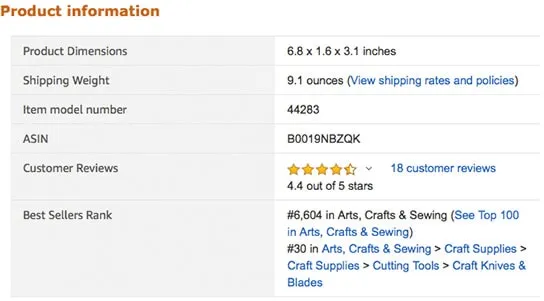
Look for items priced low but with a high price point for the consumer. Research wholesale prices to determine how much you can make from each sale. Check the requirements of the supplier or distributor and read their delivery times, payment terms, return policies, customer service availability, and more.
Then use Amazon Profit Calculator to get an estimate of how much you’ll make for each sale. This will help you determine whether or not your product has the potential to be profitable.
Once you know what profitable products you want to sell, you will need to find wholesale suppliers. When wholesaling on Amazon, finding the right suppliers can be challenging. However, with the right approach, it is possible to source high-quality products from reliable and reputable wholesale suppliers. Here are some tips for finding the right supplier for your business:
1. Scout out local retailers or businesses that specialize in selling products similar to what you are looking for and ask them for their supplier list.
2. Look for industry trade shows or conferences where you can meet wholesale suppliers directly and learn more about the products they offer.
3. Attend an Amazon sellers’ conference to network with other entrepreneurs who can provide valuable insights on finding quality and reliable suppliers.
4. Check online marketplaces like Alibaba, AliExpress, and SaleHoo to see if they can provide any leads.
5. Post a request on social media or forums to get feedback from others who may have already found a good wholesale supplier for their business.
There are lots of reliable wholesalers that offer items. You’ll need to research each supplier to determine which one is right for you. Reach out to multiple suppliers to inquire about their minimum order quantities and wholesale prices. Before making your decision, make sure to read reviews and check out customer service ratings.
With the right research and effort, you can find suppliers that will help you achieve success with your Amazon store. Once you have established a relationship with them, it is important to continue cultivating this relationship to ensure that you receive the best quality products and services.
Now it’s time to get your products listed for sale on Amazon. As you sell branded products, they are likely already listed on Amazon - so you don’t need to create new listings.
Simply select your product from the existing list and you’ll be added to that item’s listing. In case your product is new to Amazon, however, you need to make your own product listings and upload pictures of the items you want to sell. It’s important to provide accurate descriptions, pricing information, and shipment details.
Once your products are listed on Amazon, you need to fulfill orders and manage your inventory. At this stage, you must decide if you want to fulfill the orders yourself, take care of storage and delivery of the goods, or use the Fulfilment by Amazon (FBA) program. This will allow you to easily and quickly ship items efficiently.
An FBA wholesale business works by shipping inventory to Amazon’s fulfillment centers, where they store it. Then, when someone places an order, they pack and ship the product to the customer. Additionally, with FBA, your items will qualify for Prime shipping, making them more attractive to customers. Reasonably, you will have to pay some additional fees for these services, but the convenience and high service level are well worth it.
To learn more about the FBA program, read the article “What Is an Amazon Fulfillment Center and How Does It Work?”
When selling wholesale goods on Amazon, you must ensure enough inventory in fulfillment centers. If you run out of stock, you won’t be able to make any sales and risk having unsold goods and losing profits. Utilize Inventory Analytics to track stock levels and the number of sellable, reserved, and pending inbound items to manage them efficiently. This tool provides a comprehensive analysis of your assets and allows you to make informed business decisions based on data.
Twoja przeglądarka nie obsługuje elementu video.
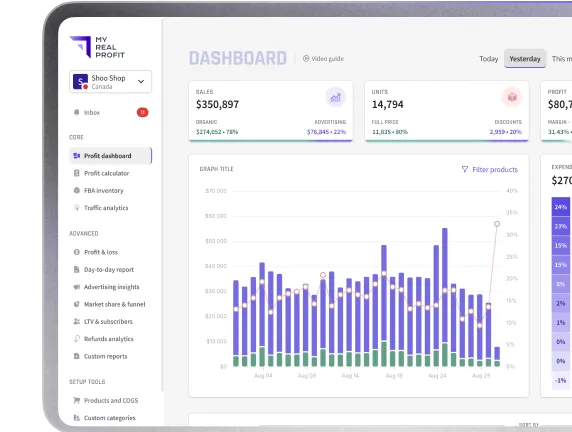
Finally, you need to monitor your listings on Amazon. You should track different metrics, such as your sales, average order value, profit, expenses, refunds.
With an accurate Profit Dashboard, you`ll be sure that your products are top and prices are up-to-date. This will help you create effective data-based strategies and maximize your profits when selling wholesale on Amazon.
Twoja przeglądarka nie obsługuje elementu video.
Running an Amazon business requires careful management of your products, customer service, and finances. To make sure you’re making the most of your time and getting the best deals on your products, handling customer service, managing inventory, and more, there are several tools available to help streamline processes and automate tasks. If you are an Amazon seller, here are 2 tools that could help you:
Sales & Profit Analytics - My Real Profit: this software helps you to keep track of the performance of your Amazon business. You can get information about what is happening right now with your Amazon store, like how much money it is making, what you are spending on it, and how much inventory you have in stock. This way, you can quickly notice if there is a problem and get it fixed before it gets too big.
Product Research - Helium 10: This tool is designed to make Amazon product research simpler and more efficient. It offers features such as keyword research, competitor analysis, and sales estimations to help users identify the right products for their business.
Amazon wholesalers must ensure they have the right tools to help them optimize their processes and remain competitive in the marketplace. The right tools can assist in streamlining processes, automating tasks, maximizing profits, and saving time. Invest in quality software to get the most out of your Amazon selling experience and run a successful wholesale business.
While selling wholesale on Amazon can be very profitable, it may not suit everyone. It requires a significant investment, extensive research on products and suppliers, as well as good business acumen. But getting into the wholesale business is worth it in the long run. Investing in high-quality tools can simplify your business processes and improve your chances of success.
Look for tools that can streamline your tasks and automate processes. Using the right tools and strategies can assist you in effectively managing your business and making more money. Best of luck with your Amazon business!