

March 10, 2023 ● 11 min read
Profit and Loss Statement for Amazon Sellers







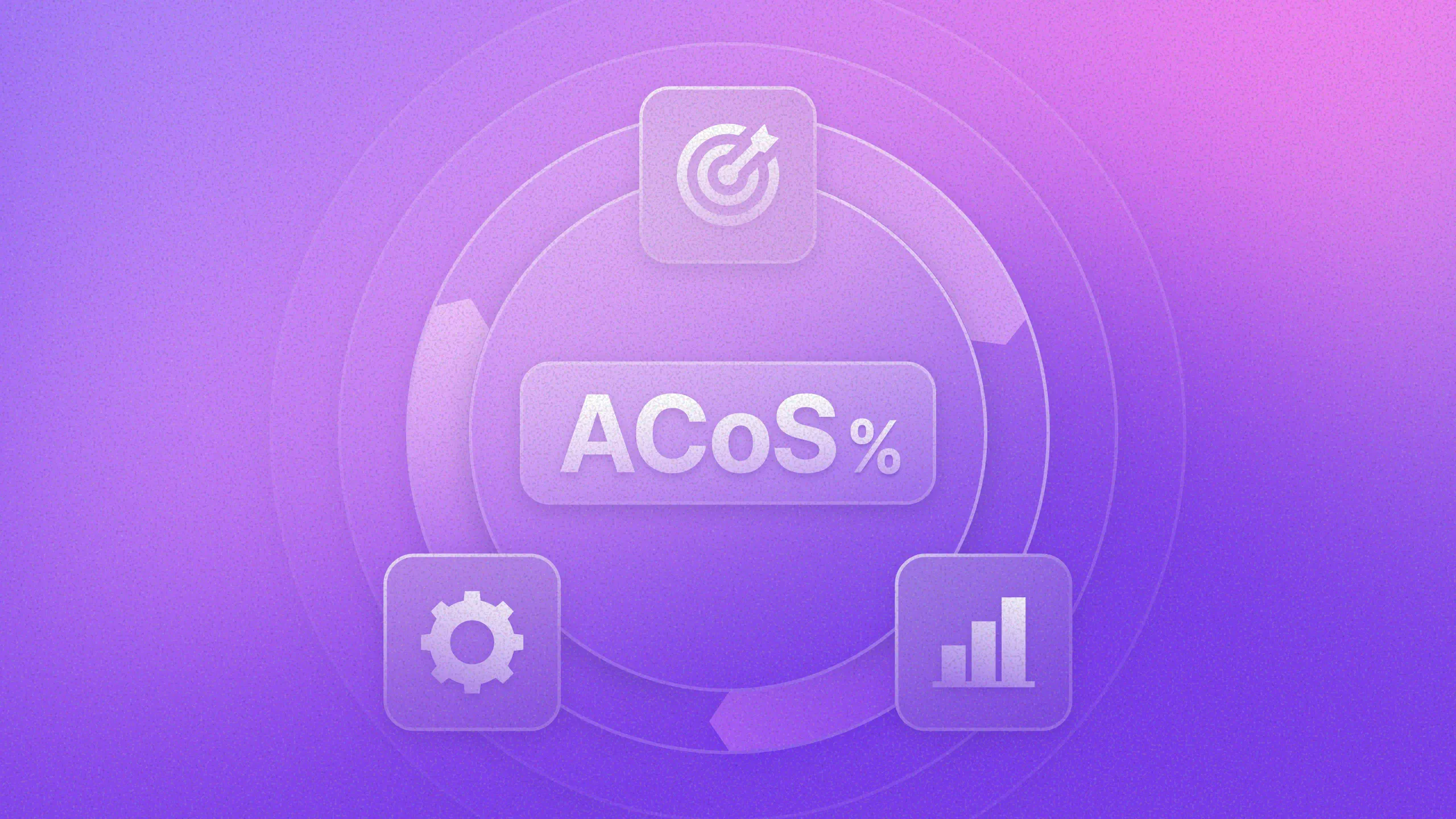

Amazon PPC is one of the fastest ways to drive traffic and sales. But without a clear understanding of performance, ad spend can quickly become inefficient. This is where Amazon ACoS (Advertising Cost of Sales) becomes critical.
Many sellers track ACoS, but few actually analyze it to make better decisions. As a result, they either overspend on ads that do not scale or cut campaigns that are driving long-term growth.
In this guide, we’ll break down how Amazon ACoS works, how it connects to profitability, and how to use it as part of a structured Amazon PPC strategy.
Amazon ACoS measures how much you spend on advertising to generate revenue from ads. Think of it as your advertising efficiency score, the number that tells you whether your ad dollars are working hard or barely pulling their weight. The formula is simple:
ACoS = Ad Spend ÷ Ad Revenue × 100
Let’s say you spend $100 on ads and generate $500 in sales:
ACoS = $100 ÷ $500 × 100 = 20%
This means you spend $0.20 to generate $1 in ad revenue. For some brands, that’s a win. For others, it’s a warning sign. The number itself is neutral; what matters is what you do with it.
Therefore, Amazon ACoS helps sellers better understand which products or ad campaigns drive the most sales and generate the highest return on investment (ROI). At its core, the advertising cost of sales tells you how efficient your advertising is.
Unlike most Amazon performance metrics, Amazon ACoS is not just a reporting number; it is a decision-making tool.
It helps you answer key questions:
However, ACoS alone is not enough. The same ACoS can mean completely different things depending on your margins and goals.
Figuring out the best Amazon ACoS for your business can be difficult. There is no one correct answer - it depends on what you want to do and how you want to use Amazon advertising.
A 30% ACoS might be profitable for one product and unprofitable for another. The reason is simple: ACoS only makes sense when compared to your profit margin, and what counts as healthy varies significantly by product. This is where break-even ACoS becomes critical.
Break-even ACoS is the point where your ad spend equals your profit margin, the threshold that tells you whether your advertising is paying off or costing you more than it returns.
At this point:
You are simply covering your costs.
Here’s how it looks in practice. The formula is simple:
Break-even ACoS = (Price - Costs) ÷ Price × 100
Now, let’s say you’re selling a $100 product:
Break-even ACoS = ($100 - $70) ÷ $100 × 100 = 30%
Your break-even ACoS = 30%
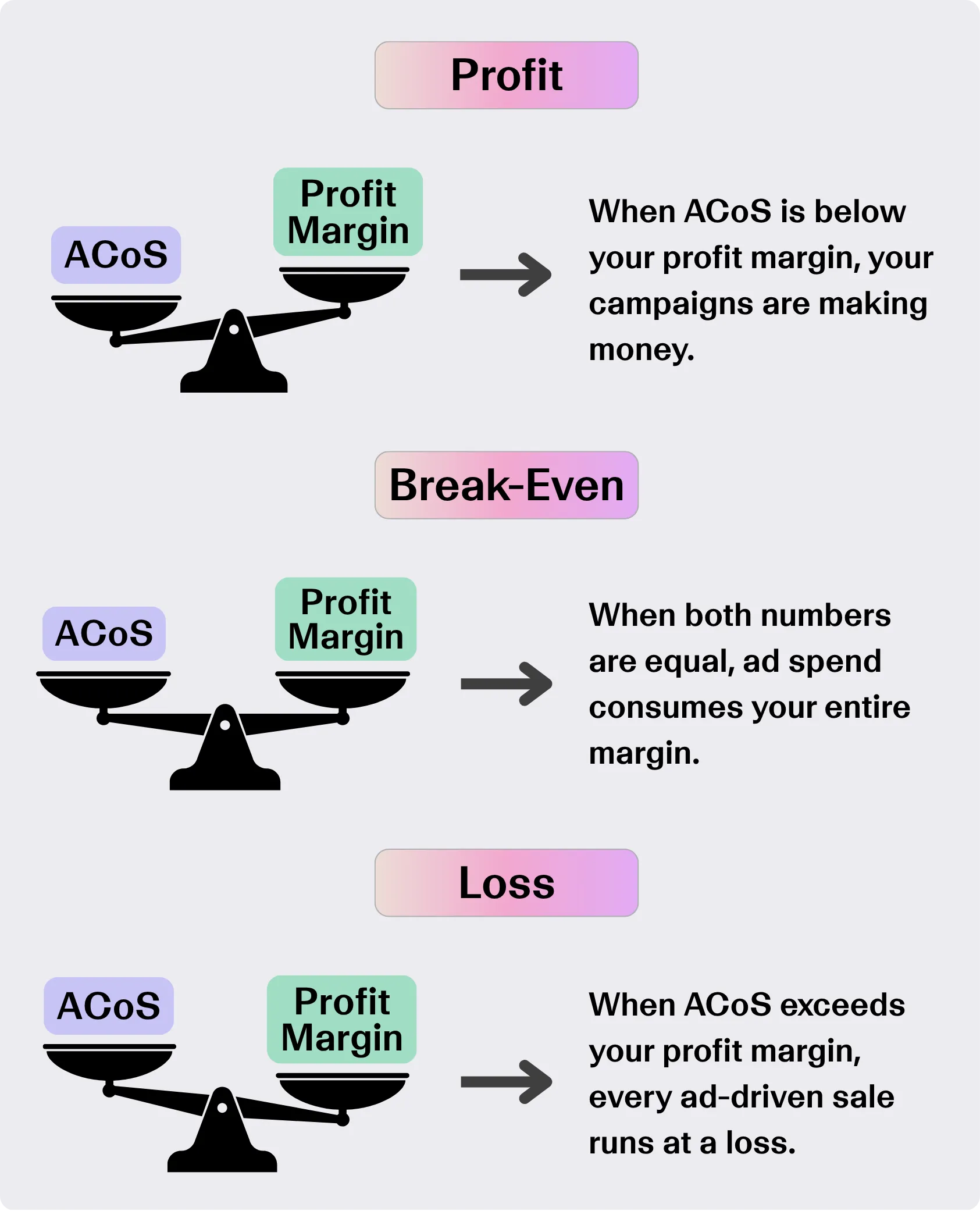
That 30% is your benchmark. Everything below it means your ads are generating real profit; everything above it means ad spend is outpacing your margin:
Once you know your break-even ACoS, you always know exactly where the line is, and whether your Amazon PPC performance is working for you or against you.
Many sellers optimize campaigns toward arbitrary ACoS targets like 20% or 25%. But without understanding break-even ACoS, these targets are meaningless.
Two campaigns can have the same ACoS but completely different outcomes:
The difference is not the campaign. It is the product economics. This is why ACoS should always be analyzed together with profit margin.
To calculate break-even ACoS, you need to understand your true profit margin, which is the maximum you can spend on ads while still turning a profit. Here’s how to calculate it in three simple steps.
Step 1: Find your profit margin
Your profit margin is what’s left after covering all costs. To calculate it, gather these four numbers:
Then apply the formula:
Profit Margin = (Revenue − COGS − Fees − Refunds) ÷ Revenue × 100
For example:
Profit Margin = ($100 − $50) ÷ $100 × 100 = 50%
This means for every dollar in revenue, you keep $0.50 after costs. That 50% is your break-even ACoS.
Step 2: Calculate your Amazon ACoS
Now you need your actual ACoS, which is what your campaigns are currently spending relative to the revenue they generate. This is the number you will compare against your profit margin.
Apply the formula:
ACoS = Ad Spend ÷ Ad Revenue × 100
For example:
ACoS = $500 ÷ $1,500 × 100 = 33%
Step 3: Compare your Amazon ACoS to your profit margin
With both numbers in hand, the comparison is straightforward. Put them side by side, and you immediately know where you stand:
In our example, a 33% ACoS against a 50% profit margin means your campaigns are in good shape – you have room to increase spend and still stay profitable. But if, for instance, your ACoS were 60%, that same product would be losing money on every ad-driven sale.
Step 4: Act on the gap
Knowing your break-even ACoS is only useful if it changes how you manage your campaigns. Here’s how to read the gap between your actual ACoS and your profit margin:
The goal is not to hit a single ACoS number across all campaigns. It is to know, for each product, exactly how much room you have, and make every budget decision from there.
Finding your target ACoS takes some analysis, but the process is straightforward. Start by working through these key steps:
Once you have a target in mind, use the formula below to confirm it:
Target ACoS = Break-even ACoS − Target Profit Margin
From there, experiment with different keyword combinations, bids, and budgets, tracking results along the way, until you hit your goal.
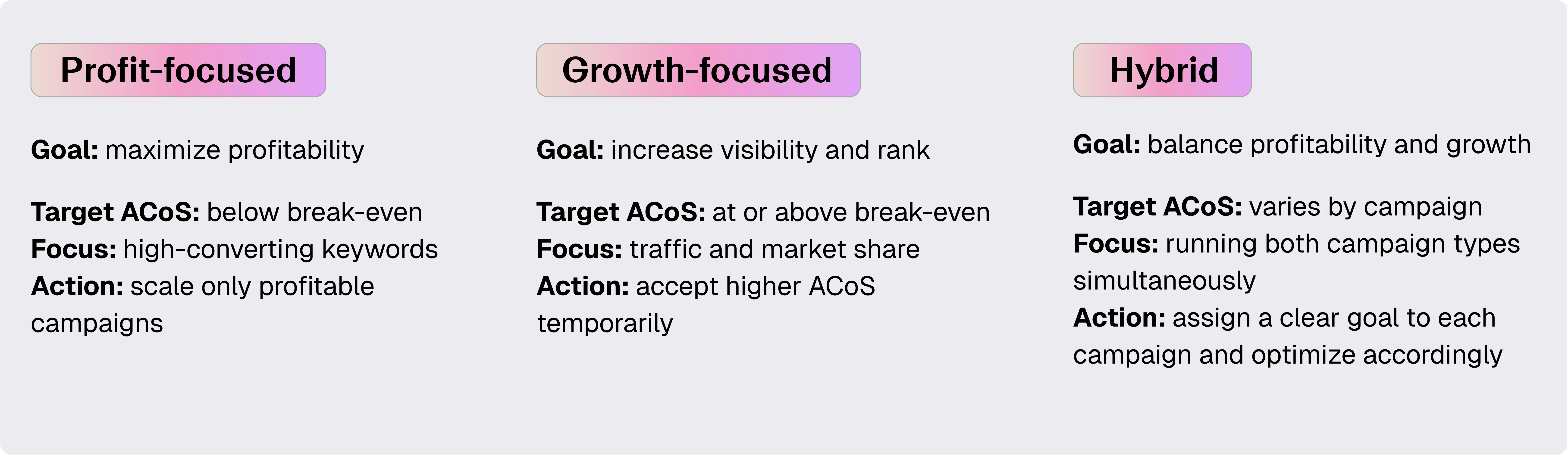
Not all campaigns should target the same ACoS. Your broader Amazon advertising strategy should define how you use ACoS across different campaign types.
1. Profit-focused strategy
Goal: maximize profitability
2. Growth-focused strategy
Goal: increase visibility and rank
3. Hybrid strategy
Goal: balance profitability and growth.
Most experienced sellers run both at once:
The key is knowing what each campaign is supposed to do, and making sure your optimization decisions reflect that.
Improving Amazon ACoS is not just about lowering ad spend. It is about improving efficiency across the entire funnel, and that means looking at every step between a shopper seeing your ad and actually buying your product. There are four areas where most sellers have room to improve:
1. Improve conversion rate
ACoS is heavily influenced by conversion rate. Yet it is the first thing worth checking when your ACoS stops improving. In this case, if your listing does not convert, you will pay more for every sale, regardless of how well your campaigns are structured.
Focus on Amazon listing optimization:
Improving conversion rate lowers ACoS without reducing traffic, meaning you get more sales from the same ad spend, not less visibility.
2. Optimize keyword targeting
Your campaigns may be set up correctly, but if you are bidding on the wrong keywords, your ACoS will reflect that. Not all keywords perform equally, which is why having a structured Amazon keyword strategy matters as much as the bids themselves.
You should:
This is one of the fastest ways to improve the advertising cost of sales – small targeting adjustments can shift your ACoS significantly without touching your budget.
3. Track TACoS alongside ACoS
ACoS only tells you how efficient your ads are against ad-driven sales. But it says nothing about what is happening to your organic sales at the same time. That is where knowing your TACoS becomes essential.
In order to calculate TACoS, use this formula:
TACoS (Total Advertising Cost of Sales) = Ad Spend ÷ Total Revenue (ads + organic) × 100
Here is why it matters: Imagine your ACoS stays constant over two months. On the surface, nothing has changed. But if your TACoS is gradually decreasing over that same period, that is actually a good sign.
This means:
Therefore, tracking both metrics together gives you a complete picture of whether your advertising is building something sustainable or just paying for sales one click at a time.
4. Use time-based optimization
Your ACoS does not stay the same year-round, and if you are managing your campaigns with a fixed target regardless of the time of year, you are likely either leaving money on the table or overspending when it matters least.
ACoS can vary significantly depending on:
Take Q4 as an example: Conversion rates go up, shoppers are ready to buy, and your ACoS naturally drops as a result. That is the time to increase bids and push budget into your best campaigns.
In the off-season, the opposite is true: Conversion rates soften, ACoS climbs, and holding the same spend level means paying more for the same results.
Understanding how timing affects your ACoS lets you allocate budget where it will work hardest, and pull back when conditions are working against you.
Many sellers misuse ACoS in ways that limit their growth. Most of the time, it comes down to the same three mistakes:
1. Optimizing only for low ACoS
A low ACoS feels like a win, but chasing it too aggressively can work against you. When you cut bids and pause campaigns to bring ACoS down, you often sacrifice visibility and traffic in the process, which means:
If your sales volume is dropping alongside your ACoS, you are optimizing the wrong thing.
2. Ignoring break-even ACoS
Without knowing your break-even ACoS, every campaign decision is a guess. You might be hitting a 20% ACoS and feeling good about it, but the reality could look very different:
Without your break-even ACoS, you are making budget decisions without knowing if they are profitable.
3. Turning off high ACoS campaigns too early
Not every campaign is there to generate immediate profit. Turning them off because the ACoS looks high, without understanding what job they are doing, means cutting spend that was actually working. Some campaigns exist to:
High ACoS does not always mean bad performance. It means you need to ask what the campaign is supposed to do before deciding whether it is doing it.
Amazon ACoS is one of the most tracked metrics in Amazon PPC, but on its own, it doesn’t tell you much.
The sellers who use it effectively connect it to their profit margin, break-even point, campaign goals, and growth strategy. That’s when it stops being a reporting metric and starts being a decision-making framework.
The fundamentals remain the same: know your break-even ACoS before you scale, tie every campaign back to profit, and never optimize for a metric you don’t fully understand.
This is where My Real Profit comes in. Our software gives you advanced, easy-to-read analytics built around your actual margins, so you can track break-even ACoS per product, connect ad spend to true profit, and make confident decisions.
You can try it out yourself today – completely free for 21 days, no credit card needed, and your data will be up and running within 72 hours of registering.
Amazon ACoS (Advertising Cost of Sales) is a key Amazon PPC metric that measures the percentage of ad spend compared to ad-generated revenue. It shows how much you spend on ads to generate each dollar of sales.
Amazon ACoS is calculated using the formula: ACoS = Ad Spend ÷ Ad Revenue × 100
A “good” Amazon ACoS depends on your profit margin and business goals. There is no universal benchmark. ACoS should always be compared to your break-even ACoS to determine if your campaigns are profitable.
Break-even ACoS is the point where your advertising cost equals your profit margin. At this level, you are neither making nor losing money on ads. If your ACoS is below this level, your campaigns are profitable. If it is above, you are losing money.
Break-even ACoS is critical because it gives you a clear benchmark for evaluating Amazon PPC performance. Without it, you may optimize toward arbitrary ACoS targets that do not reflect actual profitability.
To improve your advertising cost of sales, focus on:
Lower ACoS comes from improving efficiency, not just reducing ad spend.
No. A high ACoS can be part of a growth-focused Amazon PPC strategy. Some campaigns intentionally run at higher ACoS to increase visibility, improve organic rankings, or acquire new customers.
ACoS measures ad spend relative to ad-driven revenue only, while TACoS (Total Advertising Cost of Sales) measures ad spend against total revenue, including organic sales. TACoS helps you understand the long-term impact of your advertising.
Amazon ACoS should be used as a decision-making metric within your broader Amazon PPC strategy. It helps determine which campaigns to scale, optimize, or pause based on profitability and growth objectives.