Free Amazon FBA profit calculator

Amazon FBA profit calculator: see your real profit after fees, ads and refunds

Free Amazon FBA profit calculator: your full P&L

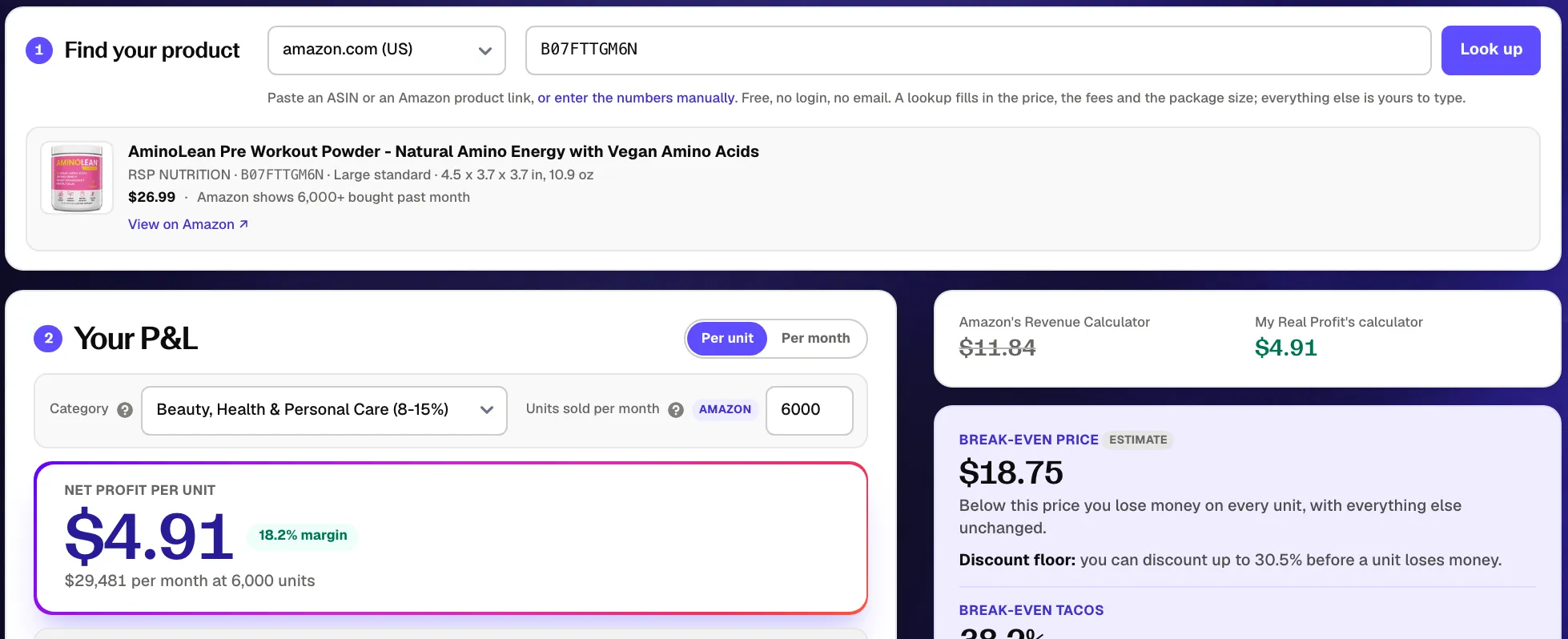
1 Find your product

Paste an ASIN or an Amazon product link, . Free, no login, no email. A lookup fills in the price, the fees and the package size; everything else is yours to type.

2 Your P&L

Net profit per unit

Pick a product above, or start typing the numbers below.

$0.00 net profit per unit, 0.0% net margin, $0 per month at 500 units.

  • Enter the price customers pay.
Line Per unit % of price
0.0% $0
0.0% $0
0.0% $0
0.0% $0
0.0% $0
0.0% $0
0.0% $0
0.0% $0
Net profit
$0.00 0.0% $0
Net margin
0.0%

Enter the packaged size and weight to see the size tier.

Estimates from Amazon US rate cards effective 15 Jan 2026 (peak card from 15 Oct 2026) plus the 3.5% FBA surcharge from 17 Apr 2026. Assumptions are labelled; edit any field to replace them. Your costs stay in your browser; only the ASIN you look up is sent to our server to fetch the listing, and the "Copy link" button puts your numbers in the link you share.

Amazon's Revenue Calculator vs My Real Profit's calculator

Pick a product above, or start typing the numbers below.

Break-even price

Pick a product above, or start typing the numbers below.

What should you charge?

$0.00

Enter the price customers pay to see where it goes.

12-month outlook

estimate

Sep 2026 to Aug 2027, General online retail seasonality

Enter your sale price to see the 12-month outlook for General online retail.

Seasonality index for General online retail is an estimate, built from US retail sales by store type and published Amazon event data, not from this listing's own history. Price, costs and ad spend held constant, each month priced on the 15th. Amazon peak fees applied Oct 15 to Jan 14 (FBA) and Oct 1 to Dec 31 (storage).

Amazon fees, explained

How Amazon FBA fees are calculated: referral, fulfillment and storage

Amazon bills an FBA sale in layers: a percentage of the price, a fee by size and weight, storage by volume and time, plus smaller situational fees. Every line the calculator shows, at 2026 US rates, verified 10 Sep 2026.

Fee 2026 US rate When it applies How the calculator handles it
Referral fee 8% to 45% of the sale price by category; most categories 15%; $0.30 minimum per item Every sale, charged when the order ships Category rate card, or Amazon's quoted percentage when you look up an ASIN
FBA fulfillment fee Flat fee per unit by size tier, weight band and price band (under $10, $10 to $50, over $50); for example $4.20 for a large standard 8 to 12 oz item priced $10 to $50 Every FBA order; the peak card applies to orders shipped 15 Oct 2026 to 14 Jan 2027 Rate card from your size and weight, Amazon's quote from the lookup, or your own figure (also FBM)
Fuel and logistics surcharge 3.5% of the fulfillment fee (about $0.17 per unit on average) Since 17 Apr 2026, US and Canada, no end date announced Multiplied onto every rate-card fulfillment fee
Monthly storage fee $0.78 per cubic foot (Jan to Sep) and $2.40 (Oct to Dec) for standard-size; $0.56 and $1.40 for oversize Monthly, on average daily inventory; billed the 7th to 15th of the next month Per unit sold from package volume and your days of stock (default 60)
Inbound placement service fee $0.14 to $1.90 per standard-size unit and $1.10 to $6.50 per bulky unit with minimal shipment splits; $0 with Amazon-optimized splits Per unit received, charged 45 days after the shipment arrives Midpoint of the band inside Other Amazon fees; $0 when you pick optimized splits
Low-inventory-level fee $0.32 to $2.09 per unit by size tier and days of supply Only when both 30-day and 90-day days of supply are below 28 Not modelled per unit; cover it in the Other Amazon fees percentage (default 2%)
Aged inventory surcharge $0.50 to $7.90 per cubic foot by age from 181 days; per-unit minimum $0.30 (366 to 455 days) and $0.35 (456+ days) Monthly, on units aged 181 days or more Not modelled per unit; a high days-of-stock value is the warning sign
Refund administration fee The lesser of $5.00 or 20% of the referral fee, kept by Amazon when it refunds the referral fee Every refunded order Inside the Refunds line, together with the fulfillment fee Amazon does not return
Returns processing fee $1.78 to $5.00+ per returned standard-size unit by weight, only above the category threshold (Grocery 2.9%, Beauty and Health 5.5%, Home and Kitchen 8.1%); apparel and shoes on every return Returns above the threshold, billed the 3rd month after shipment Only the share of returns above the threshold, inside the Refunds line
Removal or disposal fee $0.84 to $2.89 per standard-size unit by weight (more above 2 lb); $3.12 and up for bulky and special handling When you dispose of or remove an unsellable unit Added per unsellable returned unit (default 100% for consumables, 25% otherwise)
Closing fee $1.80 per unit Media categories only (books, DVD, music, software, video games) Added automatically when the category carries one
Ad spend, refunds and other fees Your inputs: advertising investment (TACoS, default 10% of sales), refund rate (prefilled 30% below your category's returns-processing threshold), other Amazon fees (default 2% of sales for coupons, deals, prep and subscriptions) Whenever you advertise, get returns or run promotions Their own P&L lines, labelled as assumptions until you change them

US rates from Amazon Seller Central: 2026 FBA fulfillment fee rate cards, referral fees, monthly storage fees, returns processing fee. Rate cards effective 15 January 2026, plus the 3.5% fulfillment surcharge from 17 April 2026. Other marketplaces use their own cards (see the marketplaces table below). Fees verified 10 Sep 2026. For how these lines land in a monthly statement, read profit and loss for Amazon sellers.

Estimated, not measured

This P&L runs on estimates. Your account has the real numbers.

My Real Profit reads your real fees, refunds and ad spend from Seller Central and runs this P&L for every product, every day.

Start free trial

21-day free trial, no credit card. Read-only.

What it does

What is this free Amazon FBA calculator?

The Amazon FBA profit calculator by My Real Profit is an Amazon seller calculator for FBA. It works out net profit on one product, per unit. It takes the price and Amazon's fees from the listing, you add your own costs, and it returns profit, profit margin, ROI and break-even price.

It doubles as an FBA fee calculator and a revenue calculator, because every Amazon fee is listed on its own line, in the order it leaves your payout. Use it to price a new product before you order it, set a floor for coupons and discounts, and see how much of your margin refunds take.

Anyone selling on Amazon can use it. No account and no sign-up: it runs in your browser. When you are ready for the same view on every ASIN from your own orders, the Amazon profit analytics guide explains what changes once the numbers come from your account instead of a form.

The formula, line by line

  1. Sale price
  2. Referral fee
  3. FBA fulfillment fee
  4. Monthly storage
  5. Other Amazon fees
  6. Product cost
  7. Refunds
  8. Advertising
  9. Net profit

Net profit divided by the sale price is your margin. Divided by the landed product cost it is your ROI. The calculator runs all eight lines from an ASIN, or from numbers you type.

What you'll get

How the FBA profit calculator helps you

The calculator answers the question behind your next order:

Decide whether to order

Your real profit per unit at the price you plan to sell at, after Amazon's fees, your landed cost, ads and refunds, plus a 12-month outlook that follows your category's seasonality and Amazon's peak fees.

Set your discount floor

The break-even price for coupons and Subscribe & Save, and a chart of where every price goes, so you can see the profit and the margin at each one. Discount below the floor and every extra unit loses money.

See where the margin goes

How much ads and refunds take out of every unit, next to the fees Amazon shows you. Those two lines are usually the gap between Amazon's estimate and the payout you see.

How it works

How the Amazon FBA profit calculator works

Three steps, and your costs never leave your browser. Only the ASIN you look up is sent to our server to fetch the listing.

  1. Amazon FBA calculator ASIN lookup with the listing's price and Amazon fees filled in automatically 1

    Step 1. Enter your product

    Type an ASIN or paste an Amazon link. The price, size, weight, category and Amazon's fee estimate fill in for you. No ASIN yet? Type the size and weight instead.

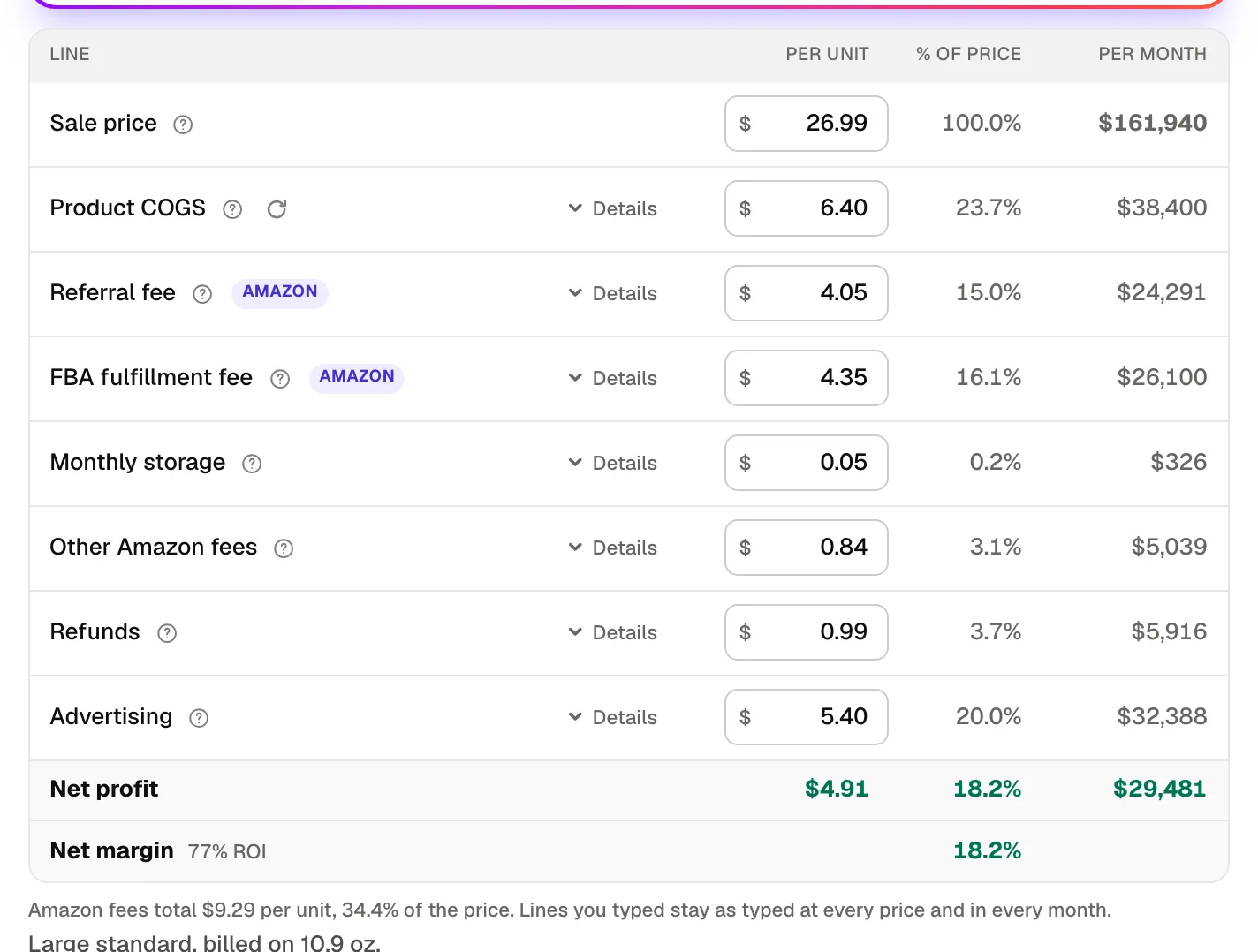
  2. Amazon FBA profit calculator cost inputs: product cost, advertising investment and refund rate 2

    Step 2. Add your own costs

    Add your product cost, advertising investment and refund rate. Every other assumption sits in the line it belongs to: open "Details" on any row to see the numbers behind it and change them. Every figure recalculates as you type, and the defaults are labelled until you change them.

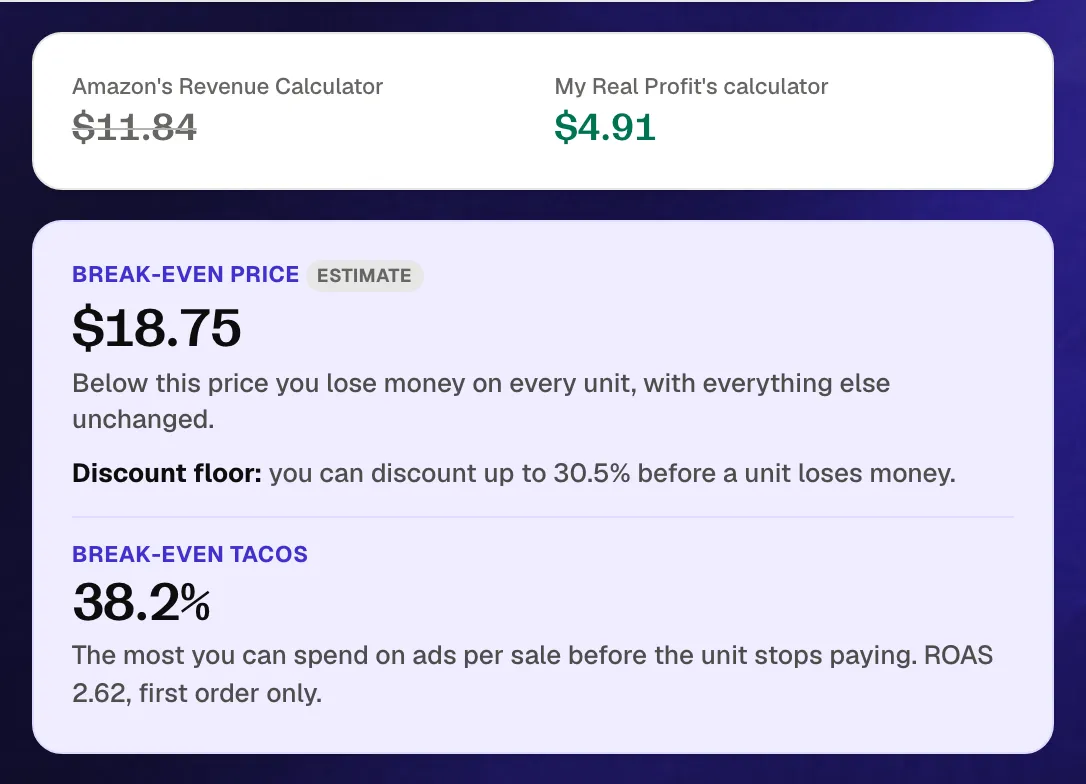
  3. FBA calculator result: net profit per unit against what Amazon's own calculator would show, with the break-even price and break-even TACoS 3

    Step 3. Read your result

    See your net profit per unit, margin, ROI and break-even price, then the full P&L, the price chart and the 12-month outlook.

From one product to your whole catalog

The calculator works one product at a time, on numbers you type in. To get the same view for every ASIN from your real data, connect your account: click 'Start free trial', fill in the form, then click 'Connect Amazon Account' and pick your region. Connecting takes under five minutes, and full reports are ready in 2 to 3 days.

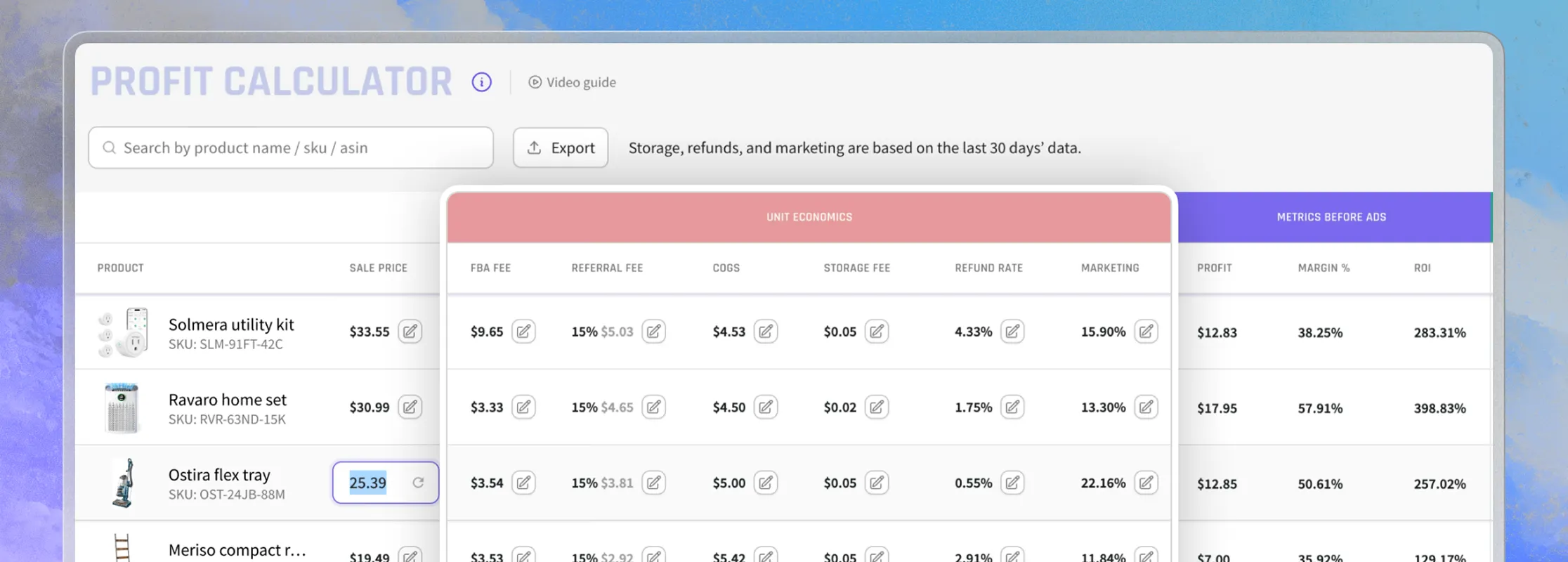
Inside the platform you can run the same numbers on your real account data, with COGS, fees, refunds and ad spend pre-filled from your last 30 days.

Start free trial
My Real Profit profit calculator on real account data, every ASIN pre-filled
Compared

How this differs from Amazon's FBA Revenue Calculator and other free calculators

Amazon's FBA Revenue Calculator is accurate for what it covers: referral, fulfillment, storage, placement and closing fees. It has no field for advertising or refunds and no break-even price. Here is where each tool stops.

What you get Amazon's Revenue Calculator Typical free calculators This calculator
Advertising as a share of sales (TACoS) No field; only via "Miscellaneous cost" Rare; a few take a cost per unit Yes, as a share of sales, on its own P&L line
Refunds and the refund admin fee No field Rare; a flat return rate at most Yes: refund rate, admin fee, returns processing fee, unsellable units, disposal
Other Amazon fees Placement, closing, low-inventory and disposal fees Rarely beyond referral, FBA and storage Placement per unit plus a percentage for coupons, deals, prep and surcharges
Break-even price No A few Yes, re-checking the fee bands at every price
Profit and margin at other prices No No; one tool shows a plus or minus 10% table Yes, a price chart with your price, break-even and the 50%-before-ads price all marked
12-month outlook No No Yes, estimated from your category's seasonality and Amazon's peak fees
Comparison with top ASINs in the category No No Yes, after an ASIN lookup
Marketplaces 4 on the US site and 16 on the UK site, in separate tools 1 to 21, often without a real lookup 18 stores in one dropdown, each with its own currency, tax handling and rate cards
Sign-up and search limits Guest quota; sign in for unlimited access Often 5 searches or a daily limit before sign-up No sign-up, no email, no search quota
Monthly view (units x per unit) Yes, from an estimated sales figure Some Yes, from Amazon's bought-past-month badge or your estimate
Storage by days of stock Yes, from average units stored and units sold Months in storage, if at all Yes, days of stock with peak and off-peak rates
Fee cards and freshness Live rates, with a preview of the 15 Oct 2026 peak card Often a year or more out of date 2026 cards incl. the peak card and the 3.5% surcharge, verified 10 Sep 2026

Amazon's public Revenue Calculator and the free calculators were checked on 10 Sep 2026. Amazon lists what its tool includes and excludes on its Revenue Calculator help page: return processing fees, refund administration fees and taxes are among the exclusions.

Beyond the calculator

Key features of My Real Profit

The free calculator answers one product at a time. Inside the platform, the same numbers run across your whole account, every day, from your own orders.

See real profit for every product

Live sales and profit per product in the profit dashboard , a full Amazon profit and loss statement that reconciles fees, VAT and COGS, and refunds analytics for what returns really cost you.

Track where your ad spend goes

Advertising analytics with PPC performance down to the hour, Net ACoS and a search-term waste finder, plus traffic analytics for sessions and conversion by product.

Know what to reorder and when

FBA inventory with stock overview, forecasts and daily inventory levels, so the days-of-stock figure you typed into the calculator becomes a live number for every ASIN.

My Real Profit reads your data through the official SP-API and Advertising API. It only reads data, so it never changes your listings, prices or settings. Behind the platform is a human data team that configures the reports to your business model, and the ACoS versus TACoS versus ROAS guide explains the ad metrics the calculator uses.

Who it's for

Who uses this FBA calculator for Amazon and for what tasks

New and private-label sellers

Check if a product still earns money at the price you plan to launch with, before the first purchase order goes to the supplier.

CPG and repeat-purchase brands

Set a price floor for coupons and Subscribe & Save discounts, then track real margin per unit over time as fees and ad costs move.

Agencies

Show a client in one screen why a product looks profitable in Amazon's calculator and is not, with ads and refunds on the same page.

Durable-goods sellers

Test heavy or bulky products where fulfillment, storage and inbound placement decide the margin, including the new Small Bulky tier.

Marketplaces

Amazon FBA calculator for the US, UK, Canada and other marketplaces

Pick a store and the calculator switches currency, tax handling and Amazon's rate cards; the US is the default. Where the price includes VAT, GST or IVA, the tax comes out before the margin is worked out.

Store Currency Tax in the price ASIN lookup Fee tables
United States (amazon.com) USD No sales tax in the price ASIN or link Referral, FBA, storage, placement, returns, disposal
Canada (amazon.ca) CAD No; GST/HST added at checkout ASIN or link Referral, FBA (with 3.5% surcharge) and storage rate cards; Amazon's quoted FBA fee when you look up an ASIN
Mexico (amazon.com.mx) MXN 16% IVA in the price; referral on the IVA-inclusive price ASIN or link Referral, FBA and storage rate cards; Amazon's quoted FBA fee when you look up an ASIN
United Kingdom (amazon.co.uk) GBP 20% VAT in the price; fees ex-VAT ASIN or link Referral, FBA, storage, digital services fee
Germany (amazon.de) EUR 19% VAT in the price ASIN or link Referral, FBA, storage
France (amazon.fr) EUR 20% VAT in the price ASIN or link Referral, FBA, storage, digital services fee
Italy (amazon.it) EUR 22% VAT in the price ASIN or link Referral, FBA, storage, digital services fee
Spain (amazon.es) EUR 21% VAT in the price ASIN or link Referral, FBA, storage, digital services fee
Netherlands (amazon.nl) EUR 21% VAT in the price Manual entry Referral, FBA, storage
Sweden (amazon.se) SEK 25% VAT in the price Manual entry Referral, FBA, storage
Poland (amazon.pl) PLN 23% VAT in the price Manual entry Referral, FBA; storage is billed in EUR and not estimated
Belgium (amazon.com.be) EUR 21% VAT in the price Manual entry Referral, FBA, storage
Japan (amazon.co.jp) JPY 10% JCT in the price (8% for food and drink) ASIN or link Referral, FBA and storage rate cards; Amazon's quoted FBA fee when you look up an ASIN
Australia (amazon.com.au) AUD 10% GST in the price Manual entry Referral, FBA and storage rate cards
India (amazon.in) INR GST at the product's rate in the price ASIN or link Referral, closing fee, pick and pack, weight handling and storage rate cards; Amazon's quoted FBA fee when you look up an ASIN
United Arab Emirates (amazon.ae) AED 5% VAT in the price Manual entry Referral, FBA and storage rate cards
Saudi Arabia (amazon.sa) SAR 15% VAT in the price Manual entry Referral, FBA and storage rate cards
Brazil (amazon.com.br) BRL Taxes embedded in the price (depends on your tax regime) ASIN or link Referral, FBA and storage rate cards; Amazon's quoted FBA fee when you look up an ASIN

In the UK and EU the referral percentage applies to the VAT-inclusive price and the fees themselves are quoted ex-VAT; the calculator follows each store's base. Tax charged on Amazon's fees (VAT on fees, Japan's JCT, India's GST) is ignored because registered sellers reclaim it. Manual entry means you type the price, size and weight; the rate cards still do the rest.

Fee changes 2026

What changed in Amazon FBA fees in 2026

The calculator uses the current cards, so every change below is already in your numbers. Fees verified 10 Sep 2026.

  1. 15 Jan 2026

    FBA fulfillment fees were restructured by size tier, weight band and price band (under $10, $10 to $50, over $50): an average change of +$0.08 per unit by Amazon's own count. A new Small Bulky tier lowered bulky fees; referral fees and storage rates did not change.

  2. 15 Jan 2026

    Returns processing fee thresholds were set per category (Grocery 2.9%, Beauty and Health 5.5%, Home and Kitchen 8.1%); the fee applies only to returns above the threshold, and to every return of apparel and shoes. The inbound placement bands and the low-inventory-level fee changed the same day.

  3. 16 Jan 2026

    The aged inventory surcharge gained a 456+ day tier at $7.90 per cubic foot with a $0.35 per-unit minimum.

  4. 1 Mar 2026

    Removal and disposal fees are billed per unit when each unit is removed; the standard-size 0 to 0.5 lb rate fell from $1.04 to $0.84.

  5. 17 Apr 2026

    A 3.5% fuel and logistics surcharge now multiplies every FBA fulfillment fee in the US and Canada, peak fees included: about $0.17 per unit on average, with no end date announced.

  6. 15 Oct 2026

    Holiday peak fulfillment fees run to 14 Jan 2027 by ship date, about $0.32 per unit above the non-peak card. Peak storage rates ($2.40 per cubic foot, standard-size) run from 1 October to 31 December, as every year.

  7. Next

    Amazon announces the following year's US fees in October with at least 90 days' notice, so expect a 2027 card effective around 15 January 2027. Fees on this page were verified on 10 Sep 2026.

Read the originals on Amazon: Amazon's 2026 fee announcement, 2026 referral and FBA fee changes summary, fulfillment fee rate cards, fuel and logistics surcharge notice.

FAQ

FBA calculator questions, answered

Yes. The Amazon FBA calculator on this page is free to use, with no account, no email and no search quota to unlock. The only paid product is My Real Profit itself, which runs the same numbers on your real account data.
Enter a product by ASIN or Amazon link, or type its size and weight, then add your cost of goods, advertising investment and refund rate. Every other assumption lives in the P&L line it drives: open "Details" on a row to see inbound shipping, the package Amazon bills, the referral rate and the rest. The profit, margin, ROI, break-even price, price chart and 12-month outlook update as you type. Your costs never leave your browser; only the ASIN you look up is sent to our server to fetch the listing.
Amazon's tool counts Amazon's costs: referral fee, fulfillment, storage and inbound placement, and it takes a cost of goods figure. It has no field for your ad spend or your refund rate, and it does not give you a break-even price. This calculator asks for those too, so the profit number is closer to reality, and it shows Amazon's figure next to yours.
Yes. Storage is part of the cost per unit: the calculator takes your product's volume, the 2026 rate ($0.78 per cubic foot from January to September and $2.40 from October to December for standard-size) and your days of stock. Keep in mind Amazon bills monthly storage between the 7th and 15th of the next month, so on your Seller Central reports the cost appears weeks after the sale.
Yes. Fees are for Amazon.com (USA) by default, so the numbers match a US seller account. Switch the store to use the calculator for Amazon UK, Germany, France, Italy, Spain, the Netherlands, Sweden, Poland, Belgium, Canada, Mexico, Japan, Australia, India, the UAE, Saudi Arabia or Brazil, each with its own currency and tax handling.
Not exactly, and that is on purpose. My Real Profit ties every cost to the date the order was placed, while Amazon pays out on its own schedule, so a payout can cover sales and fees from different weeks. Storage and returns processing fees are also billed weeks or months after the sale.
It depends on the category and the size of the product. In the worked example above, a $24.99 beauty product pays $3.75 in referral fee, $4.35 in FBA fulfillment and about $0.89 in storage, placement and other fees at January to September rates, so Amazon keeps roughly $36 of every $100 in sales. Your product cost, ad spend and refunds come out of the remaining $64.
Three fees apply to almost every FBA sale. The referral fee is a percentage of the sale price by category, most often 15% with a $0.30 minimum. The FBA fulfillment fee is a flat amount per unit set by size tier, shipping weight and price band, multiplied by the 3.5% surcharge since April 2026. Monthly storage is charged per cubic foot on your average inventory; the calculator works all three out from the size, weight, category and price you enter.
Amazon's 2026 update, effective 15 January 2026, changed the average FBA fulfillment fee by about $0.08 per unit and left referral fees and storage rates unchanged. The larger change came on 17 April 2026, when a 3.5% fuel and logistics surcharge was added to every fulfillment fee. The 2026 changes section above lists every dated change.
The benchmarks sellers quote in surveys and forums cluster around 15% to 25% net margin after every cost, and below 10% leaves little room for a fee change or a slow month. For CPG and repeat-purchase brands the first-order margin is only half the picture: a customer who reorders can justify a thinner margin, or a higher ad spend, on the first sale. Our free break-even ACoS calculator shows how far that goes.
Referral and FBA fees come from Amazon's published rate cards (verified 10 Sep 2026), applied to the size, weight, category and price you enter or that we read from the listing; when Amazon quotes a fee for the ASIN, the calculator uses that. Storage, placement, refunds and other fees are modelled from your inputs and labelled as estimates. Your actual fees depend on how Amazon measures your product, your inventory levels and your account settings, so treat the result as a close estimate, not an invoice.
Yes. Enter ad spend as TACoS (total ad spend divided by total sales; the default is 10%) or as a cost per unit, and it appears as its own line in the P&L. ACoS measures ad spend against ad-attributed sales only, while TACoS spreads it across every sale, which is the right basis for a per-unit profit figure.
A refund costs more than the lost sale. Amazon returns the referral fee minus a refund administration fee (the lesser of $5 or 20% of the referral fee), keeps the FBA fulfillment fee, and may charge a returns processing fee on returns above your category threshold. If the unit cannot be resold, which is the default for consumables, you also lose the product cost and pay a disposal fee. The calculator models all of that from one refund rate.
The inbound placement service fee is included per unit, using the midpoint of Amazon's range for minimal shipment splits, or $0 if you choose Amazon-optimized splits. The low-inventory-level fee only applies when both your 30-day and 90-day days of supply fall under 28, so it is not modelled per unit; cover it, along with coupons, deals and prep, in the other Amazon fees percentage.
Yes, with one change: switch the FBA fulfillment fee from 'Estimate from size' to 'Enter my own' and type your own fulfillment cost per unit (FBM). The referral fee, refunds and ad spend work the same way for both. A full FBA versus FBM side-by-side view is not part of this version.
The calculator searches for the lowest price at which net profit per unit reaches zero after every line, including ads and refunds, and rounds up to the cent. It re-checks the referral percentage and the FBA price band at every step, because both can change when the price crosses $10 or $50. The result is your floor for coupons, Subscribe & Save tiers and deals, and the price chart beside the P&L marks it against your price and the price that would leave half of every sale before ads.
The units you enter are treated as this month's sales. For each of the next twelve months, starting with the current one, the calculator scales them with a seasonality index for your category family (toys and games peak in November and December, supplements in January, garden in spring) estimated from US retail sales by store type and published Amazon event data, then prices each month with the Amazon fees that apply to it in your store: the peak FBA fulfillment card (15 October to 14 January) exists in the US, Canada, the UK and Germany, most other stores raise storage rates from October to December, and a few charge neither. The caption under the chart names the windows your store uses, and each month is priced as at its 15th. Price, costs, ad spend and refund rate are held constant, and the index is directional, not a forecast for your listing, so use your own sales history where you have it.
Nothing is sent to Amazon. Your costs, prices and assumptions stay in your browser: only the ASIN you look up is sent to our server to fetch the listing, and our server keeps a hashed copy of your IP address for ten minutes to limit lookups. The anonymous usage statistics we keep never include your costs or prices, and session recordings mask the calculator. The one exception is the link you copy to share a scenario: it carries the price, cost, units, ad spend and refund rate you entered in its address, so share it only with people who may see them.
Yes. Leave the lookup empty and enter the price, category, package size and weight yourself; the calculator finds the size tier and the 2026 fees from those. This is the normal path for a product you have not listed yet.
Yes, for products whose economics survive the full waterfall: fees, product cost, ads and refunds. The 2026 fee update was modest on average, but the price bands, the surcharge and the returns fees punish thin margins on specific products. Run each product through the calculator rather than relying on a category average.
Next step
These are the numbers you typed.
Now get the ones from your account.

Connect your account and My Real Profit fills in COGS, FBA fees, storage, inbound, ads, refunds and discounts from your last 30 days,
then calculates profit, margin and break-even, by product, on your own data.

Start free trial
  • Real profit and break-even, by product
  • Connects in a few clicks, read-only
  • 21-day free trial, no credit card

Every product you have not checked is priced on Amazon's math, not on yours.

Official Amazon app developer. We are part of:

Amazon Marketplace Developer Council Amazon Seller Central Partner Network

Product data from an ASIN lookup is provided by Keepa. Fee rates are Amazon's own, verified 2026-09-10.