Profit & Loss

Amazon Profit and Loss Statement for Sellers

Every Amazon cost from revenue to net profit, in one statement. See exactly where your margin goes, and for which customer type.

We’re part of:

Amazon - Markerplace developer council Amazon - Seller central partner network

Trusted by

1000+

industry leaders

Best Seller in Deodorants
Salt & Stone

100%

NTB accuracy

Faster Insights

Best Seller in Sea Vegetables
True Sea Moss

Subscriber Growth

40%

NTB increase

Top agency
Trivium

100%

Auto Reporting

50hrs+

Saved

Best Seller in Home & Kitchen
CGK Linens

-18%

Wasted ad spend

10x

Decision Speed

Best Seller in Headbands
Kitsch

5hrs+

Saved Daily

100%

Profit Clarity

Best Seller in Flushable Wipes
Good Wipes

Optimization

100%

Branded view

Top agency
TripleLine

100%

Centralized Data

Reporting Speed

Best Seller in Cutting Boards
Royal Craft Wood

+13%

Gross margin

−22%

Refund reduction

Best Seller in Stick Umbrellas
UEP

Efficiency Gain

100%

Cost Control

What is the Amazon profit and loss statement?

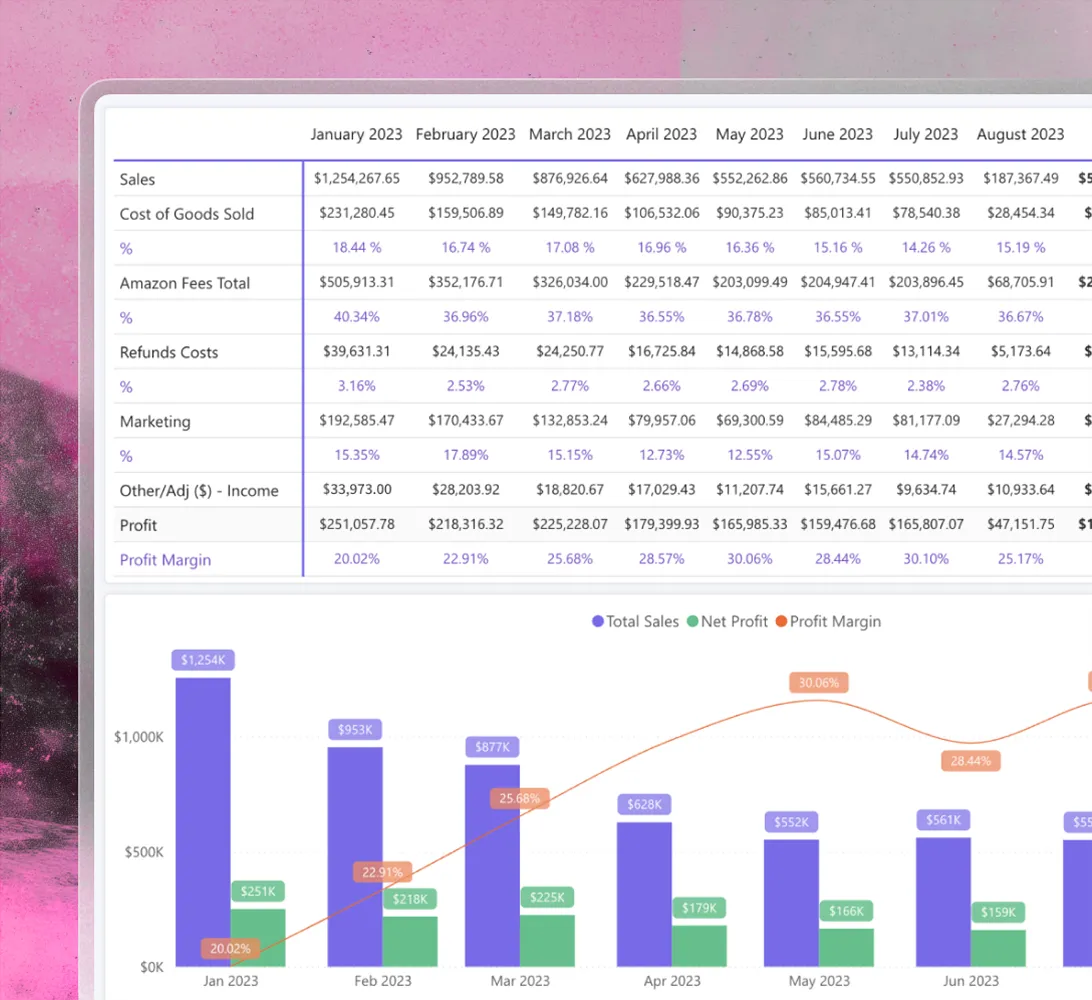
The Amazon profit and loss statement inside MyRealProfit is the Profit & Loss report: one table with every cost between your sales and your net profit. Total Sales, Cost of Goods Sold, Amazon Fees Total, Refunds Costs, Marketing, Other Fees / Adjustments, Net Profit, and Profit Margin, for the whole account or one product.

Every number is counted on the day the order was placed, not the day Amazon pays you. So your statement matches when the sales really happened.

The report has four pages: Overview, Detailed, Detailed CPG, and Compare Periods. Amazon fees are grouped into fixed and variable costs, so you can read the path from sales to profit instead of a long list of fee names.

Features

How the Amazon P&L statement
helps you

Find the cost line
that moved

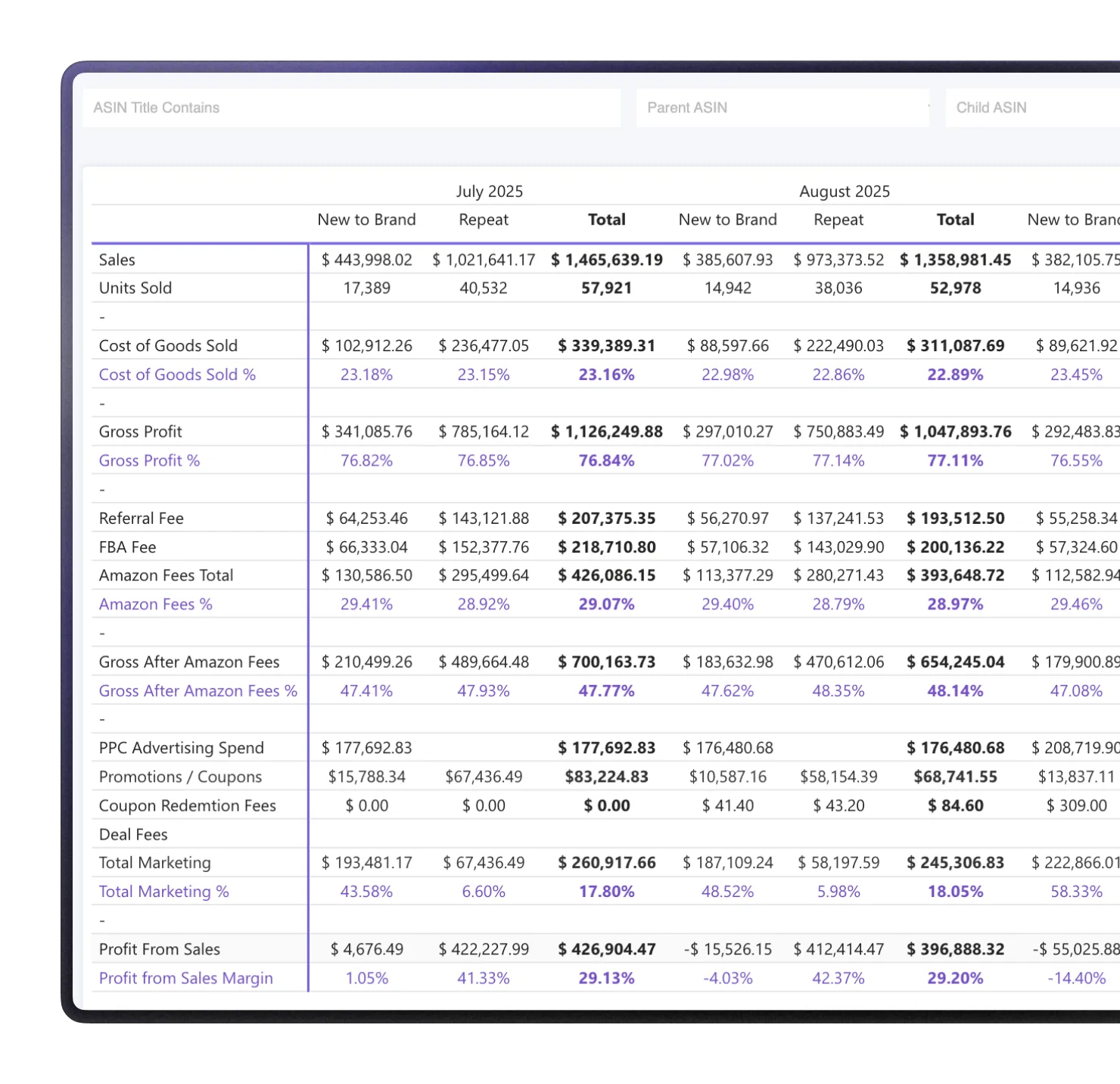
The Detailed page works as a waterfall. Each cost shows the dollar amount and the percent of sales left after it, so the biggest drop is easy to spot.

See the percent,
not just the dollars

When sales grow, your costs grow too, so the dollar number tells you little.

The percent shows if a cost is getting better or worse each month.

Get a full Amazon profit
breakdown by fee

FBA Storage Fee, Long-Term Storage Fee, FBA Disposal Fee, FBA Inbound Placement Fee, Paid Services Fee. They are small, so nobody reads them.

The Detailed Other Amazon Fees table shows all of them month by month, so a fee that doubled stands out.

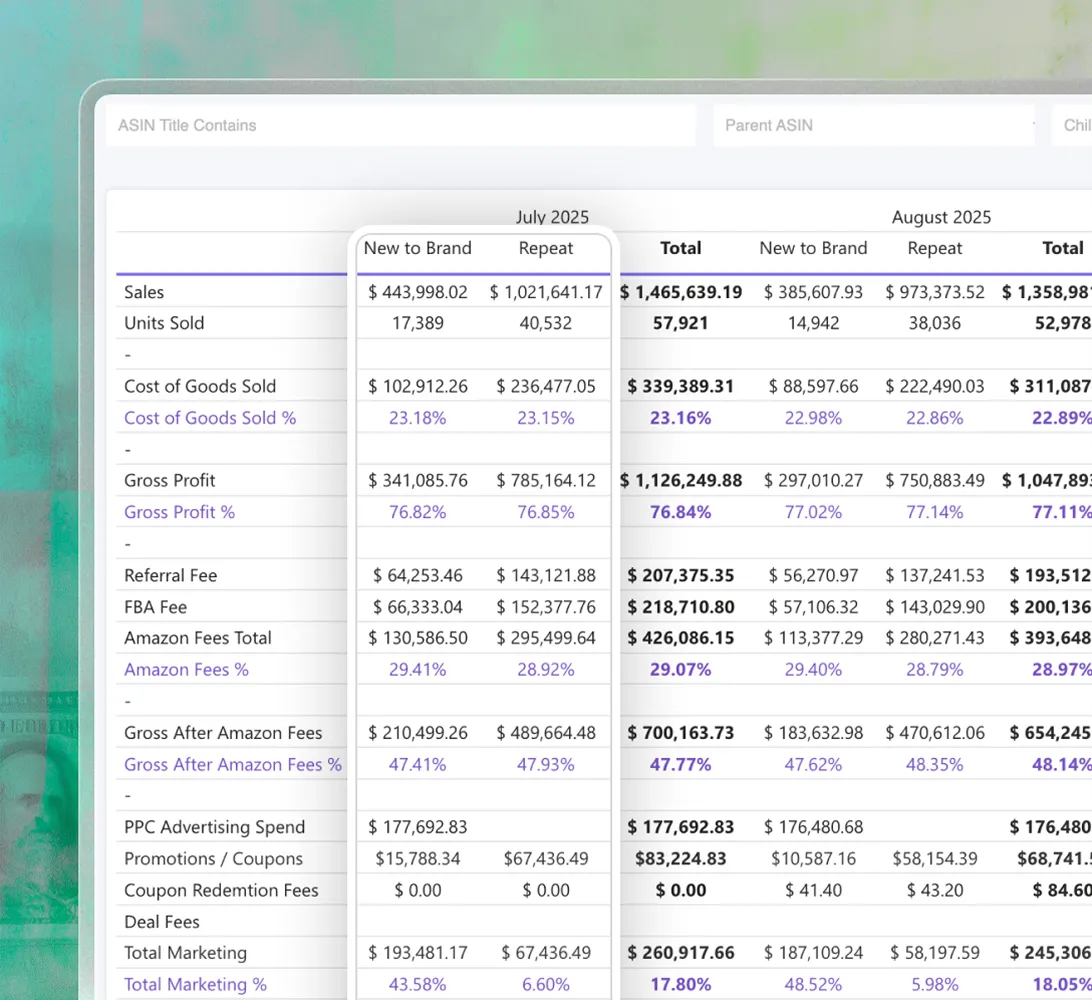
Split profit by New-to-Brand
and Repeat

For consumables, new customers often lose money, and repeat customers pay it back.

The Detailed CPG page splits every cost line by customer type, so you know if the problem is acquisition or retention.

Read the P&L
for one product

P&L by Item filters the whole statement by parent ASIN, child ASIN, or category.

Useful when the account looks fine and one product does not.

Compare two periods
and see the cause

Put this month against last month or last year. The Cause of Difference chart shows what moved your profit (sales, marketing, refunds, storage), and the By Product view names the ASINs behind it.

Key features of the tool

The Amazon P&L report is one report inside MyRealProfit. When a cost line moves, the platform has a report that explains it:

  1. 1 Profit Calculator

    Model your unit economics with the profit calculator before you launch, so your gross margin is right from the start.

  2. 2 Advertising Analytics

    Go deep on advertising analytics, down to hourly performance, when marketing moves in your P&L.

  3. 3 Refunds Analytics

    See why customers return and what your refund rate costs your margin.

  4. 4 Advanced FBA Inventory

    Amazon inventory forecasting keeps storage and long-term storage fees from growing.

  5. 5 LTV & Subscriptions

    Measure customer lifetime value over a year, not just the first order, plus Subscribe & Save retention.

  6. 6 Profit Dashboard

    The profit dashboard shows live sales and profit for your whole account, so you know today's numbers before the day ends.

MyRealProfit reads your data through the official SP-API and Advertising API, updates automatically, and only reads data, so it never changes your listings or prices.

How to use the Amazon P&L report

Here is the full flow, from sign-up to your first statement.

Step 1. Create your account

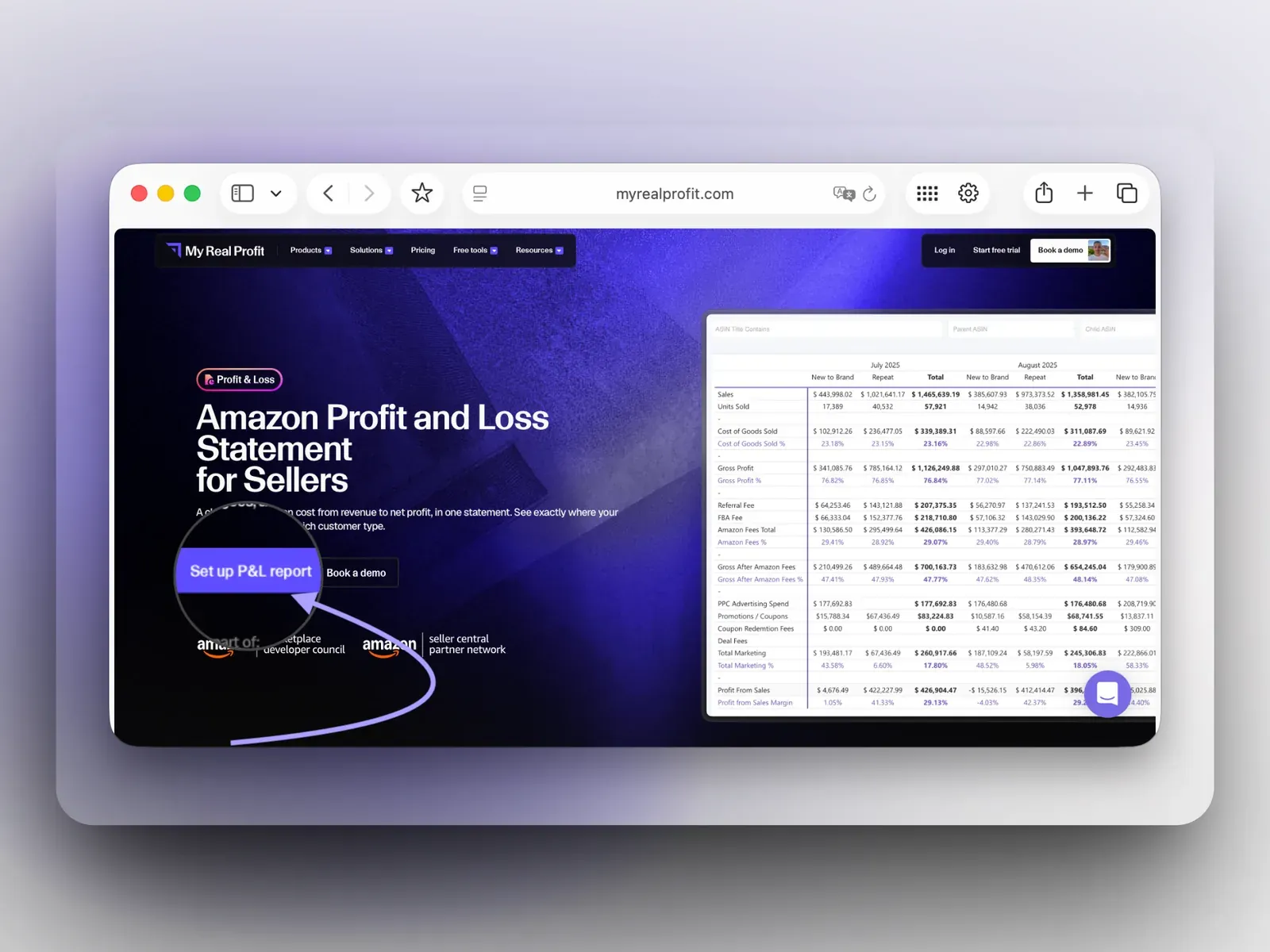
Click the 'Set up P&L report' button at the top of the page. Fill in the form and choose your business type. No credit card is required.

MyRealProfit with the Set up P&L report button

Step 2. Connect your Amazon account

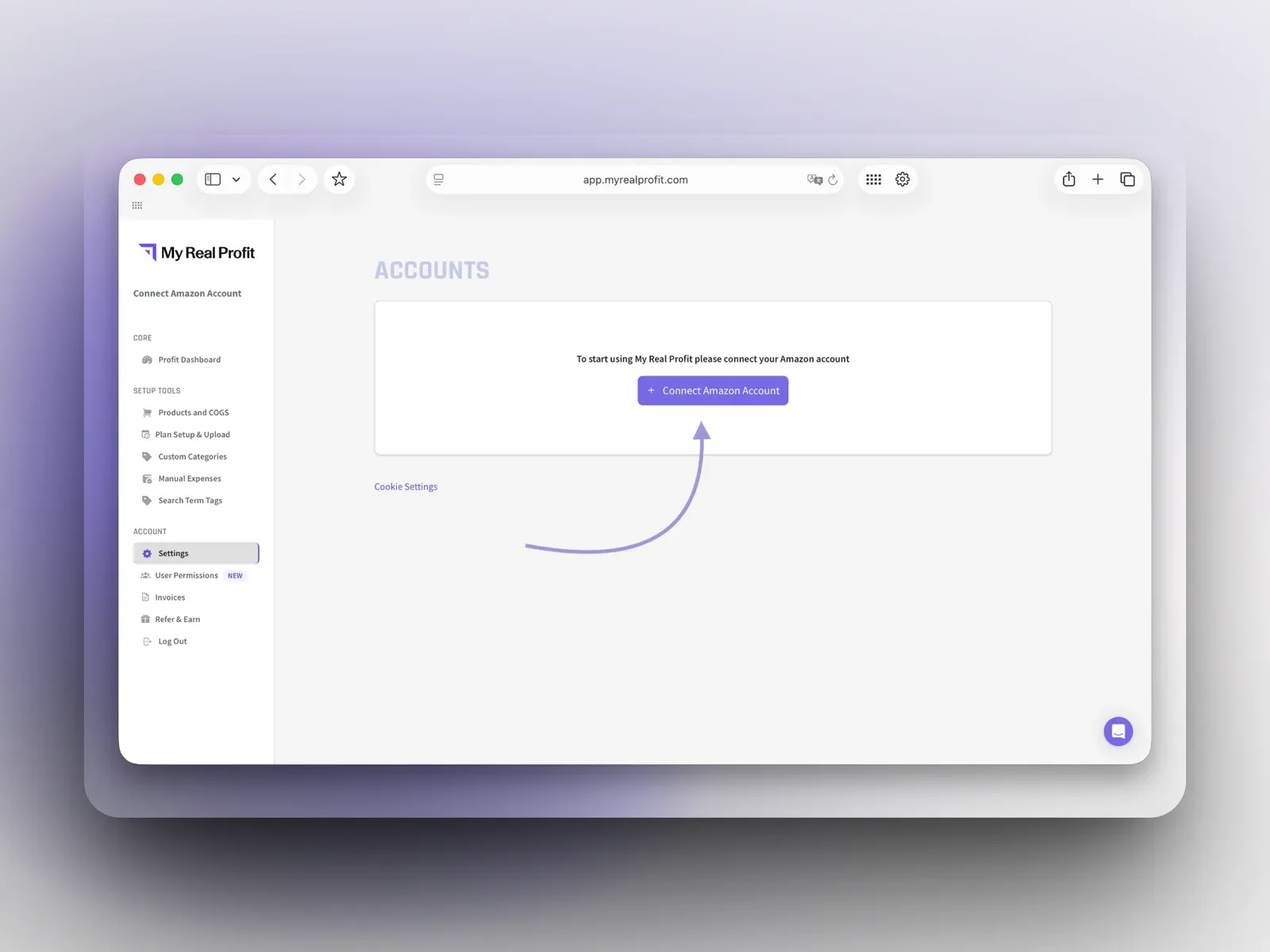
On the Accounts page, click 'Connect Amazon Account' and connect by region (North America, Europe, or Far East). This takes under five minutes.

Connect Amazon Account page in MyRealProfit

Step 3. Open the Profit & Loss report

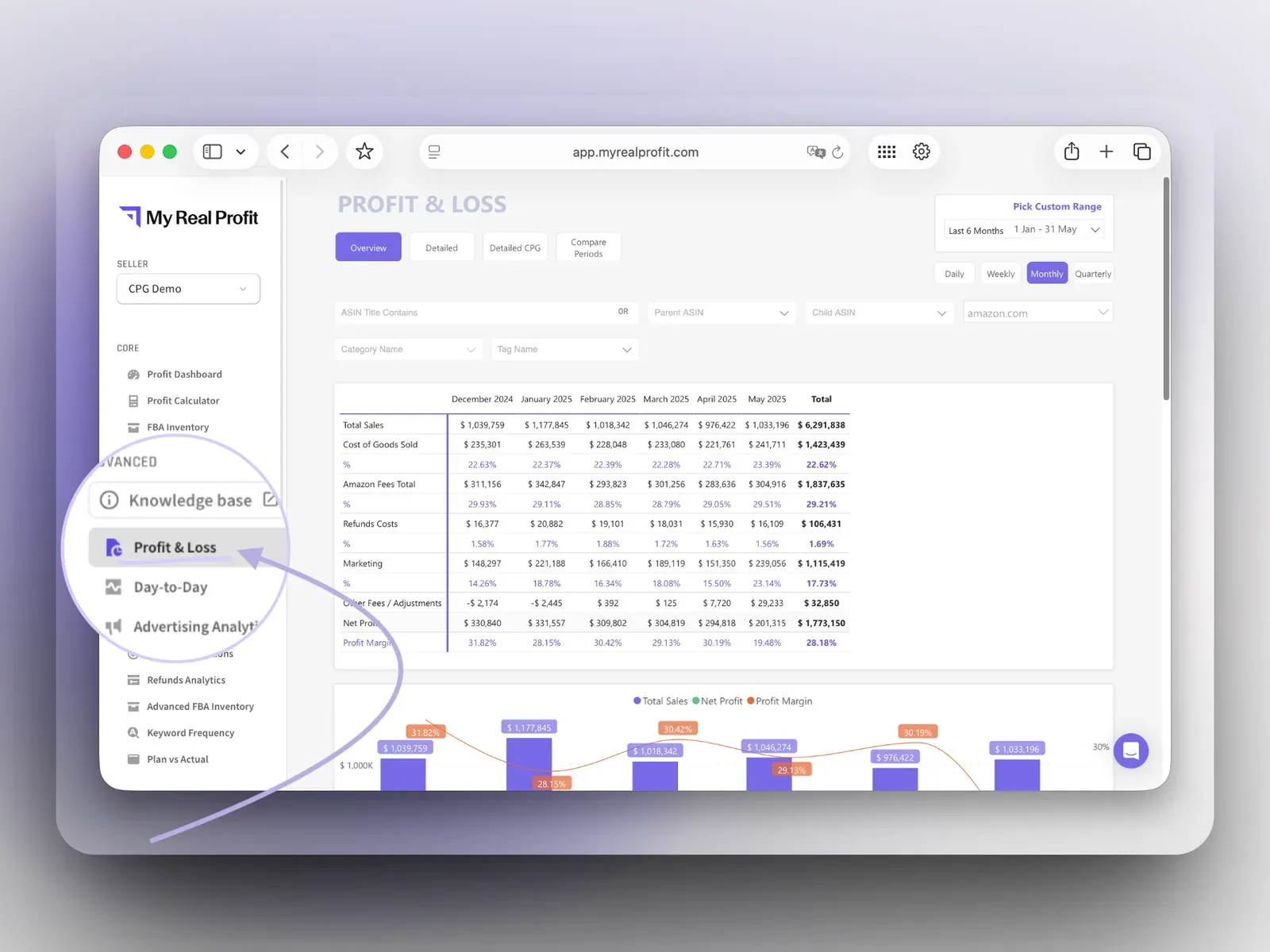
Your data imports automatically and you land on the Profit Dashboard (full reports are ready in 2 to 3 days). In the left menu, under Advanced, click Profit & Loss. This is your Amazon profit and loss statement.

MyRealProfit Amazon Profit & Loss report

See it in the video below. In the walkthrough, you can:

  • Switch between the Overview, Detailed, Detailed CPG, and Compare Periods pages.
  • Change the period (Daily, Weekly, Monthly, Quarterly, or By Item) and pick a custom range.
  • Scroll down for P&L by Item, Detailed Adjustments, Detailed Other Amazon Fees, and the All Time Data chart.

Who is the P&L report for?

CPG and consumable brands

See New-to-Brand and Repeat profit separately, instead of one averaged margin that hides both.

Durable-goods sellers

Find which fee or refund line is eating the margin on a specific ASIN.

Agencies

Track profit across client accounts and hand each client a clean monthly P&L.

Founders and finance managers

Get an accrual-based statement that matches when orders happened, without rebuilding it in Excel.

Your Amazon seller P&L in one place

A P&L only helps if it matches how Amazon charges you. That means profit by order date, fees grouped so you can read them, small charges pulled into one table, and profit split by new and repeat customers. The Amazon profit and loss statement inside MyRealProfit does all of that from your real Amazon data. MyRealProfit has a 21-day free trial, and no credit card is required.

FAQ

Every question, answered

Amazon shows sales and fees, but real profit also needs your cost of goods and your full ad spend in the same view. A P&L report that combines all three gives you net profit and margin per month, per week, or per ASIN.
You need sales, Amazon fees, refunds, ad spend, and COGS in one document. You can build it by hand from Seller Central reports every month, or connect your account and get it generated from order data. Full reports are ready in 2 to 3 days.
Yes. Profit and loss statement, P&L, and income statement are three names for the same document: revenue at the top, costs subtracted, net profit at the bottom. For Amazon, the useful version is accrual-based.
Amazon does not take a share of your profit. It charges fees: a referral fee on each sale, fulfillment and storage fees on FBA, and extras like inbound placement or long-term storage. The total depends on category, product size, and season, so the honest number comes from your own fee breakdown.
Most reports refresh every 30 minutes. Financial reports also reconcile Amazon fees, VAT, refunds, and COGS, so you see real profit after Amazon's costs.
The account pulls up to 24 months of sales and fees, and 60 days of PPC data. During the free trial you get two months of history. Your full history loads after you move to a paid plan.
  • Our insights
  • +
  • Your data
  • =
  • More Profit
Only 2 clicks stand between you
and data you've never seen before

Book a free demo call or start your free trial today and see
exactly how it works for your business.
  • No long-term contracts
  • No setup fees
  • No credit card required